
TL;DR Solace Insights can forward real-time broker metrics and alerts to your existing observability platforms like Dynatrace, New Relic, Prometheus/Grafana, Splunk, and more. This enables proactive monitoring, automated alerting, and unified observability across your entire event-driven architecture—all without leaving your preferred monitoring tools. This is a common need for organizations that maintain separate operations or security centers that already have their own visualization layers. Operations teams get the benefits of a purpose build EDA observability tool while retaining the flexibility to send some (or all) data to thier other services.
Key Benefits:
- Early warning detection – Catch slow subscribers, queue buildups, and resource constraints before they impact your business
- Unified dashboards – Monitor your event mesh alongside your applications in a single pane of glass
- Automated remediation – Trigger runbooks and auto-scaling based on broker metrics
- Historical analysis – Trend analysis and capacity planning with long-term metric retention
- Correlation – Link broker performance issues with application behavior
The Challenge: Visibility Gaps in Event-Driven Architectures
You’ve built an elegant event-driven architecture with Solace at the center. Events flow seamlessly from publishers to subscribers, topics route data intelligently, and queues provide guaranteed delivery. Everything works beautifully—until it doesn’t.
Common Scenarios We’ve Seen:
Scenario 1: The Slow Subscriber
“We discovered our Order Cancellation app was falling behind. By the time we noticed, there were 50,000 messages queued, and customers were waiting hours for order cancellation confirmations. The app team said, ‘Why didn’t anyone tell us sooner?'”
Scenario 2: The Resource Crunch
“Our broker’s spool usage hit 95% during a product launch. Messages started getting rejected, and we had no idea until customers complained. We needed to know when we crossed 80% so we could take action.”
Scenario 3: The Bridge Outage
“A network issue took down our VPN bridge between edge and cloud. The edge broker kept queueing messages for 3 hours before anyone noticed. We need automated alerts when bridges go down.”
The Root Problem
Many organizations already have observability platforms in place, and some use several depending on the team:
- DevOps teams use Datadog or Dynatrace for application monitoring
- Operations teams use Splunk for log aggregation and alerting
- Platform teams use Prometheus + Grafana for infrastructure metrics
- SRE teams use PagerDuty for incident management
But the event broker metrics live in a silo—accessible only through Broker Manager or CLI. Your monitoring tools don’t know about queue depths, consumer lag, or bridge health. More importantly, many broker metrics on other tools aren’t even instrumented to provide true end-to-end telemetry making EDA somewhat of a black box.
This creates a visibility gap. You’re flying blind until something breaks.
The Solution: Solace Insights Forwarding
Solace Insights is Solace’s unified approach to broker observability. It collects metrics, logs, and traces from all event broker form factors (appliance, software, and cloud) and makes them available through multiple channels:
- Solace Insights Datadog Sub-org – Cloud-based dashboards and analytics
- Metrics and Logs Export – Forward metrics to third-party observability platforms
- Event Notifications – Real-time alert notifications
Today, we’re focusing on #2: Metrics and Logs Export to third-party backends.
How It Works
The Insights agent runs alongside your broker, collecting metrics via the Solace Monitoring API (SEMP).
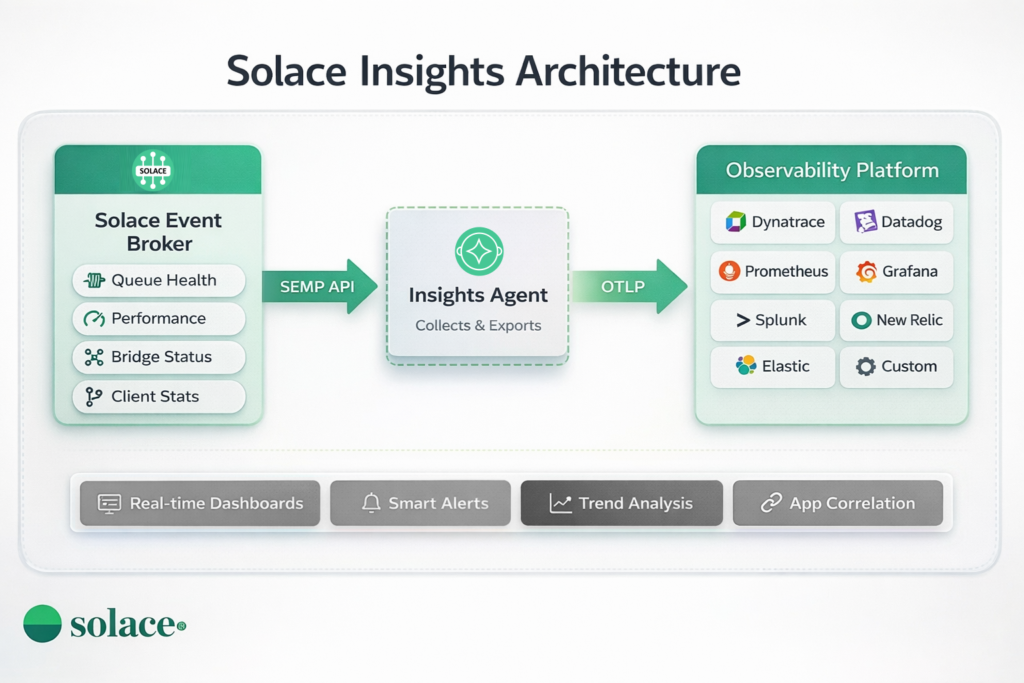
It formats and forwards them to your observability platform using standard protocols:
- Prometheus format (scrape or push)
- OpenTelemetry (OTLP)
- Vendor-specific Exporters (Dynatrace, Splunk, etc.)
Why Forward Broker Metrics to Your Observability Platform?
Integrating event broker metrics into your existing observability tools provides three critical benefits:
Unified Visibility
Your DevOps and platform teams already live in tools like Datadog, Dynatrace, Prometheus, or Splunk. They monitor applications, infrastructure, databases—everything except the event broker.
With Insights forwarding:
- Single pane of glass – Monitor your entire event-driven architecture alongside applications
- No context switching – Engineers don’t need to learn a separate tool or log into Broker Manager
- Consistent workflows – Use the same dashboards, query language, and alerting you already know
Example: Your Datadog dashboard shows application CPU, database query times, AND queue depths—all in one view. When an issue occurs, you see the full picture immediately.
Proactive Alerting & Faster Response
Insights is great for troubleshooting, but it’s limited to Insights users only. Third-party tools enable proactive monitoring within the whole organization.
With Insights forwarding:
- Automated alerts – Get notified via Slack, PagerDuty, or email when queue depths spike or bridges go down
- Early warning – Catch issues like slow subscribers or resource exhaustion before customers are impacted
- Faster MTTR – Engineers see alerts in their existing incident response tools, reducing response time by 75%+
Example: Instead of discovering a slow subscriber after 2 hours of customer complaints, you get a Slack alert within 5 minutes when queue depth crosses 10,000 messages. The on-call engineer investigates immediately and resolves the issue before customers notice.
Historical Analysis & Capacity Planning
Your observability platform stores metrics and logs for months or years, up to your choice.
With Insights forwarding:
- Trend analysis – Identify growth patterns: “Message volumes growing 20% per month, need to add capacity by Q3”
- Seasonality planning – “Queue depths spike every Monday at 9 AM, let’s pre-scale”
- Post-mortem analysis – “What did queue depths look like during last month’s outage?”
- Correlation with deployments – “Did the last app release impact message processing rates?”
Example: Your capacity planning dashboard shows message throughput trends over 6 months, helping you forecast when you’ll need additional broker capacity—before you hit limits.
Setting Up Insights Forwarding
Solace Insights supports forwarding broker metrics to popular observability platforms. The configuration is done through the Solace Cloud console, where you can easily set up integrations without modifying broker configuration.
Supported Platforms
Solace Insights can forward data to:
- Prometheus – Open-source monitoring and alerting
- Dynatrace – AI-powered application monitoring
- Splunk – Data analytics and SIEM
- New Relic – Full-stack observability platform
- Elasticsearch – Search and analytics engine (via Elastic Observability)
- Generic HTTP or gRPC endpoints – Custom integrations via OTLP or other protocols
How to Configure Data Forwarding
Step 1: Access Solace Cloud Console
- Log into your PubSub+ Cloud Console
- Navigate to your Account Details in User & Account
- Click Insights Settings
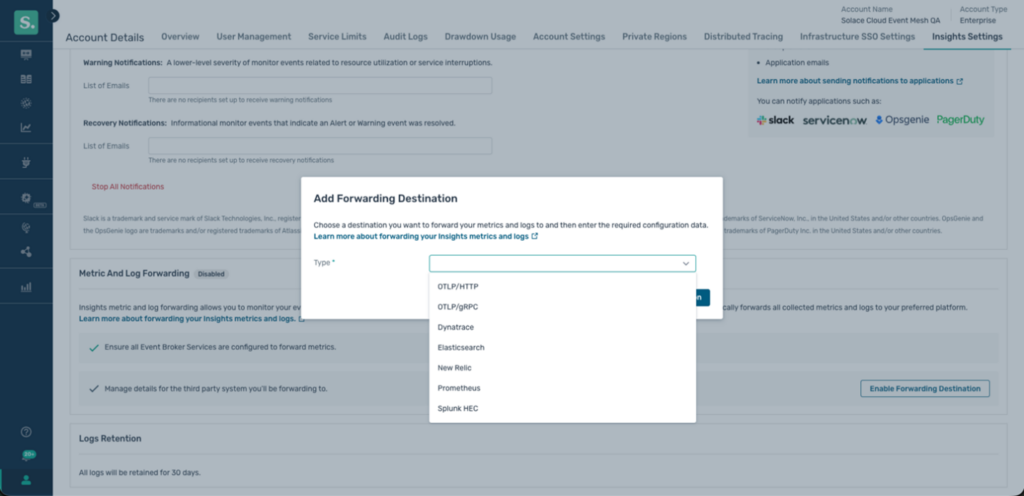
- On the Forwarding Metrics and Logs tile, click Enable Forwarding Destination.
Step 2: Create a New Forwarding Destination
- Add Destination
- Select your observability platform (e.g., Datadog, Prometheus, Dynatrace)

- Provide connection details:
- For Prometheus: Endpoint URL for remote write
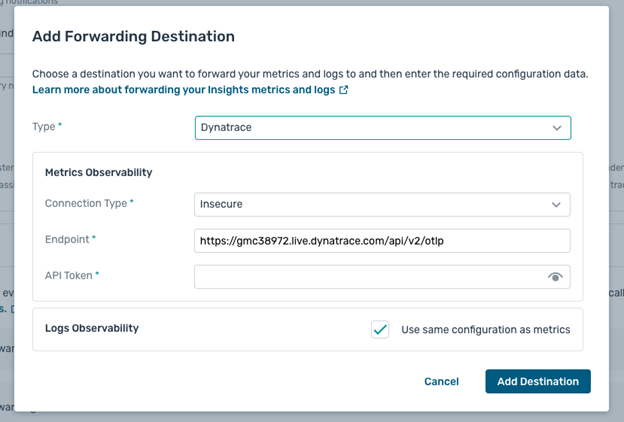
- For Dynatrace: Dynatrace OTLP API endpoint and API token
- For Splunk: HEC endpoint and token
- For New Relic: OTLP endpoint and API key
- For Elasticsearch: Elastic Cloud Managed OTLP Endpoint and API key
- For Generic HTTP or gRPC endpoints: host:port of the endpoint and credentials headers

Step 3: Configure Forwarding Settings
- Choose whether to forward metrics, logs, or both
- Configure connection security:
- Secure (TLS/SSL) – Validates server certificates
- Insecure – Skips certificate validation
- Optionally configure separate destinations for metrics vs. logs
Note: Once enabled, Insights automatically forwards all broker metrics and logs to your configured destination. The system forwards comprehensive observability data to give you complete visibility.
Step 4: Enable and Validate
- Click Save and Enable to start forwarding metrics
- Metrics will begin flowing to your platform within 1-2 minutes
Complete Setup Guide
For detailed step-by-step instructions and advanced configuration options, see the official documentation:
Solace Insights Data Forwarding Guide
This guide covers:
- Detailed configuration for each supported platform
- Authentication and security best practices
- Metric filtering and sampling options
- Troubleshooting connection issues
- Rate limits and quota management
Best Practices & Recommendations
Start with Critical Queues
Don’t try to monitor everything on day one. Start with:
- Business-critical queues (e.g., order processing, payment transactions)
- High-throughput queues (most likely to hit resource limits)
- Cross-region bridges (most likely to experience network issues)
Expand monitoring as you gain experience.
Set Contextual Thresholds
Generic thresholds don’t work well. A queue with 1,000 messages might be:
- Normal for a batch processing queue that fills up hourly
- Critical for a real-time transaction queue that should never exceed 100
Recommendation: Set thresholds based on:
- Historical baseline (P95, P99 values)
- Business SLAs (how long can customers wait?)
- Application capacity (what’s the consumer’s max throughput?)
Use your observability platform’s baseline and anomaly detection features.
Create Actionable Alerts
Bad alert: “Queue depth is high”
Good alert: “Q.cloud.order.cancelled depth is 15,234 (threshold: 10,000). Consumer lag: 45 seconds. App: order-cancellation-service. Runbook: https://wiki/slow-subscriber-response“
Include:
- Context: Which queue, what’s the current value, what’s the threshold
- Impact: What business process is affected
- Action: Link to runbook, suggest remediation (restart app, scale horizontally)
Correlate Broker and App Metrics
The real power comes from correlation. In Datadog/Dynatrace:
- Tag queues with the consuming application name
- Create dashboards that show queue metrics alongside app metrics (CPU, memory, request rate)
- Set up correlation so alerts show related metrics
Example: Alert fires for high queue depth. Dashboard immediately shows the consuming app’s CPU is at 100%—likely cause identified.
Monitor the Monitor
Set up alerts for the Insights agent itself:
- Agent down: No metrics received in last 5 minutes
- Collection lag: Metrics delayed by more than 30 seconds
- Export failures: Failed to forward metrics to backend
You need observability of your observability!
Conclusion
Event-driven architecture is powerful—but only if you can see what’s happening inside your system. Solace Insights forwarding bridges the visibility gap by bringing broker metrics into your existing observability tools.
The result? Proactive monitoring, faster incident response, and fewer customer-facing issues.
You don’t need to change your workflows. You don’t need to adopt new tools. You just need to connect your broker to the monitoring platform you already use.
Start small. Pick one critical queue. Set up one alert. See the value. Then expand.
Your on-call engineers (and your customers) will thank you.
Resources & Next Steps
Documentation
Integrations
Community
Talk to Us
- Questions? Reach out to your Solace account team
- Want a demo? Contact us for a personalized walkthrough
- Ready to get started? We can help with architecture and implementation
Explore other posts from category: For Architects




Subscribe to Our Blog
Get the latest trends, solutions, and insights into the event-driven future every week.