
Rail operations live in motion. Trains move, platforms change, delays ripple—and the control room needs to know now so it can act before disruptions cascade. In this post, I’ll use a railway monitoring prototype to show how an event-driven architecture (EDA) makes operational systems faster, more resilient, and easier to evolve. We’ll focus on the operational domain model (Zone, Division, Route, Schedule, Journey, Station, Platform) and show how Solace Event Portal helps design and govern an event mesh that scales.
Why EDA for rail ops?
Rail is a perfect fit for EDA because operational facts are inherently events:
- A train departs a station.
- A platform is reassigned.
- A schedule is updated.
- A journey is delayed.
Each of these operational facts matters to more than one system at the same time—dispatch, passenger apps, station operations, maintenance, analytics, and automation—so broadcasting them as events is a natural fit.
Also note that these are not request/response interactions. They are facts that need to propagate in real time to many consumers: dispatch, passenger apps, maintenance, analytics, and automation. EDA makes those facts first-class, scalable, and reusable.
Operational domains we model
Core domains (Ops focus)
- Zone: Large operational regions, often managed by different control centers
- Division: Sub-areas inside zones
- Route: The planned path a train follows across stations
- Schedule: The planned timetable for a train, including changes
- Journey: The live, in-motion execution of a schedule
- Station: Physical location where trains stop, pass through, or originate/terminate
- Platform: Physical resource assignment at stations
Potential expansion
- Crew, rolling stock, maintenance, yards, signals/blocks, incidents, weather, passenger load, freight, power
Event-driven system view
In this model, each domain publishes its own events. Consumers subscribe to what they need, without tight coupling to the producers.
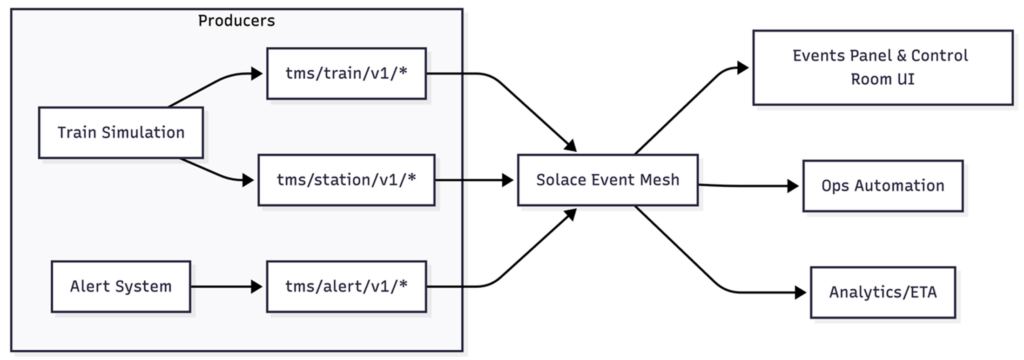
Example Operational Scenario:
Alert Generation + Management
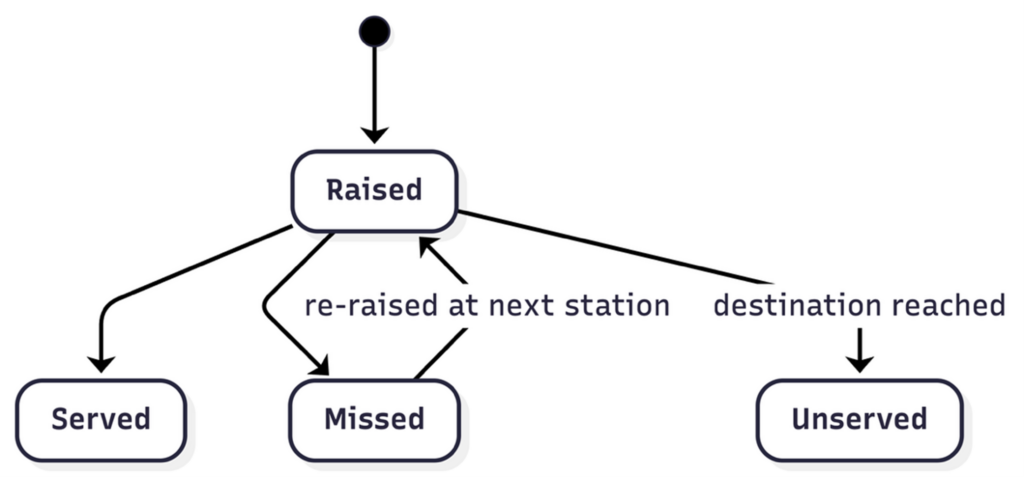
When an alert is raised onboard a running train (for example, an AC malfunction or a water issue), it is automatically propagated to the next station for action. If the alert remains unserved/unattended, it continues to roll forward to subsequent stations until the final station of the journey is reached. If still unserved at the end, the system publishes an unserved alert to indicate a failure scenario.
This event trail enables analytics on alert/issue management performance at both station level and train level. Over time, it helps identify actionable operational insights—such as repeated failure points, slow response stations, or alert types that require better preventive maintenance—ultimately improving passenger experience.
Event flow Examples
- AlertRaised is published when an alert is raised in the running train
- AlertServed is published when a station attends to the issue
If the alert is not attended at a station, AlertMissed is published, followed by a new AlertRaised event targeting the next station - Finally, if an alert remains unserved until the journey ends, AlertUnserved is published to indicate the end-state failure scenario
Consumers and Subscriptions
Ops Automation, Control Room UI, and Analytics services subscribe to operational alert events for real-time coordination and performance tracking. Passenger-facing systems typically subscribe only to schedule/platform updates needed for customer notifications.
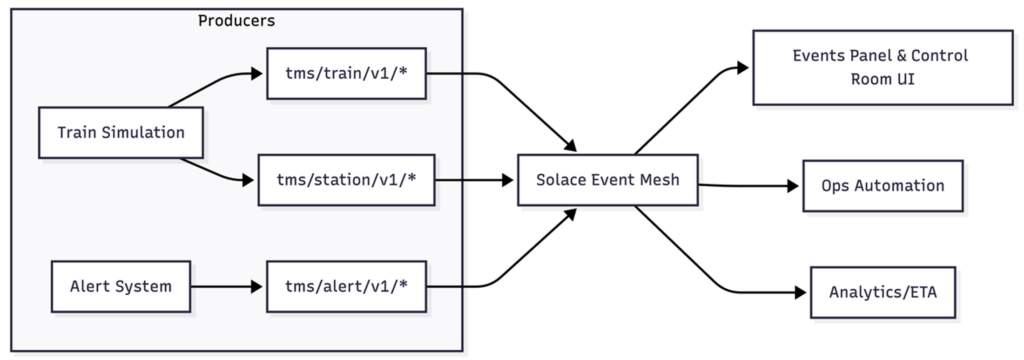
Prototype Topic Hierarchy Diagram
Domain-Driven Event Taxonomy
Events should be named and grouped by the operational domain that owns them. Here’s a starter taxonomy for ops-focused rail monitoring.
| Zone | ZoneCreated, ZoneUpdated |
| Route | RouteDefined, RouteUpdated, RouteClosed |
| Schedule | ScheduleCreated, ScheduleUpdated, ScheduleCancelled |
| Journey | JourneyStarted, JourneyDepartedStation, JourneyArrivedStation, JourneyDelayed, JourneyCompleted |
| Station | StationCreated, StationUpdated, StationClosed, StationReopened |
| Platform | PlatformAssigned, PlatformReassigned, PlatformCleared |
Topic Hierarchy Used in Prototype
The prototype uses a tms (train monitoring system) namespace with explicit versions and routing keys. This keeps events discoverable, versioned, and easy to filter.
tms/{entity}/v1/{event}/{...routing-keys}
Train Lifecycle Events
tms/train/v1/departed/origin/{origin}/{trainNumber}/{destination}tms/train/v1/arrived/destination/{origin}/{trainNumber}/{destination}
Station Movement Events
tms/station/v1/stopped/{currentStation}/{previousStation}/{trainNumber}/{nextStation}tms/station/v1/arrived/{currentStation}/{previousStation}/{trainNumber}/{nextStation}tms/station/v1/departed/{currentStation}/{previousStation}/{trainNumber}/{nextStation}
Alert Lifecycle Events
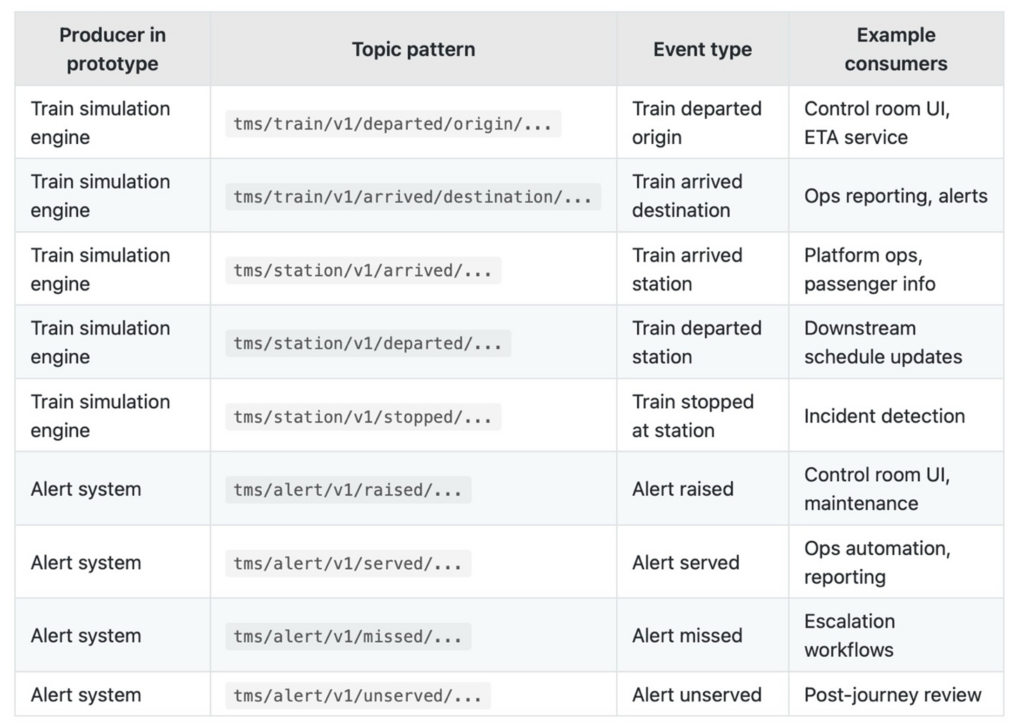
tms/alert/v1/raised/{alertType}/{trainNumber}/{stationCode}tms/alert/v1/served/{alertType}/{trainNumber}/{stationCode}tms/alert/v1/missed/{alertType}/{trainNumber}/{stationCode}tms/alert/v1/unserved/{alertType}/{trainNumber}/{stationCode}
Subscription Patterns
tms/train/v1/>tms/station/v1/>tms/alert/v1/raised/>tms/alert/v1/served/>;tms/alert/v1/missed/>tms/alert/v1/unserved/>tms/>(all TMS events)
Extending the Hierarchy for Ops Domains
To bring Zone, Division, Route, Schedule, Journey, and Platform into the same scheme, keep the tms/{domain}/v1/{event} structure and use routing keys consistently:
tms/zone/v1/updated/{zoneId}tms/division/v1/updated/{divisionId}tms/route/v1/defined/{routeId}tms/schedule/v1/updated/{scheduleId}tms/journey/v1/departed/{journeyId}/{stationCode}tms/platform/v1/assigned/{stationCode}/{platformId}
An Event-driven Rail Ops Prototype
Here is an EDA interaction diagram from Solace Event Portal for the railway monitoring prototype.
It highlights how key producers (Train Movement, Station Management, Alert Management) publish real-time operational events such as TrainArrived/Departed, StationArrived/Departed/Stopped, and AlertRaised/Served/Missed, which are then consumed by Ops Automation, Control Room UI, and Analytics & ETA services.
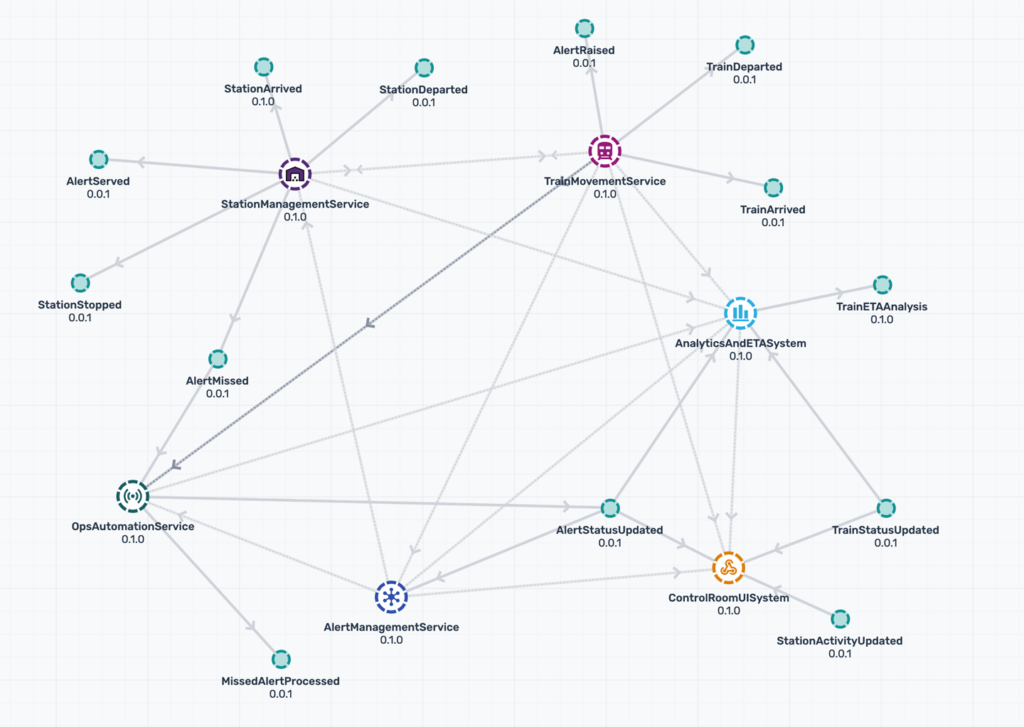
For the prototype, we keep the scope to operational domains and leave the door open for expansion. It is intentionally scoped to demonstrate event flow rather than model trains of “Vandebharath” class of Indian Railways that runs between major cities across the country. It focuses on:
- Train and station movement: single-train and multi-train simulation across a route with arrivals, stops, and departures.
- Alert lifecycle: raised, served, missed, and unserved alerts tied to trains and stations.
- Event topics and payloads: consistent, versioned topic hierarchy with payloads that carry operational context.
- Operational UI behaviors: live event panel, filtering by stream, and flags on stations that visualize alert state.
- Resilience patterns: publish toggle for operational control and an in-memory broker fallback when the external broker is unavailable.
The function of the prototype is to make the EDA model concrete and referenceable: it shows how a domain-owned event taxonomy, real-time topic subscriptions, and lightweight consumers can coordinate without tight coupling or point-to-point integrations.
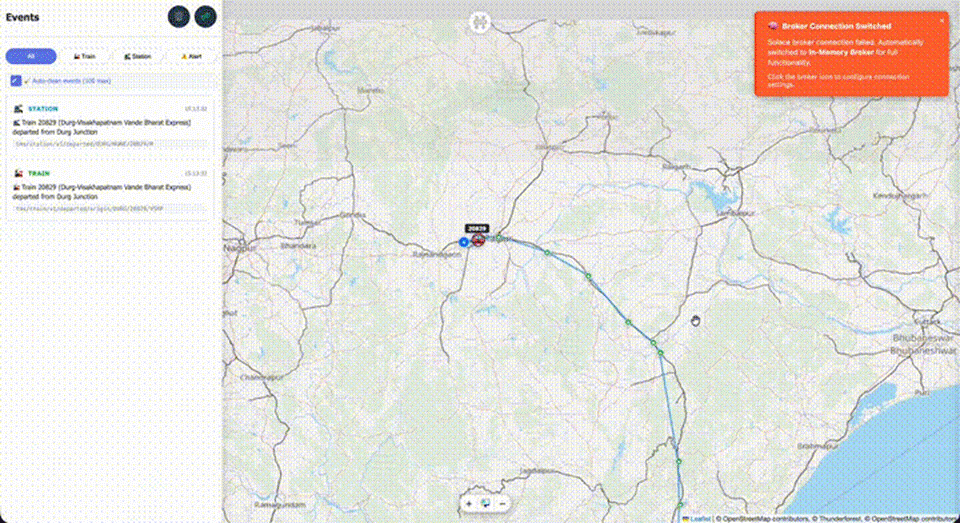
This prototype is available on Github: Source Code | Demo
Use Cases Highlighted by the Prototype
- Control room UI subscribes to tms/train/v1/> and tms/station/v1/> for live tracking.
- Alert console subscribes to tms/alert/v1/raised/> and tms/alert/v1/missed/> for escalation.
- Ops automation listens to tms/station/v1/departed/> to trigger downstream workflows.
- Analytics/ETA consumes all TMS events to compute delays and performance trends.
How the Prototype Maps to the model
The simulation showcases these EDA ideas in a visual way:
- Train and station events are published on the tms/train/v1/* and tms/station/v1/* topics as trains move.
- Alert lifecycle events flow through tms/alert/v1/* with raised, served, missed, and unserved states.
- Alert types in the prototype include water tank, breakdown, AC malfunction, and emergency.
- Event views are categorized by train, station, and alert streams, mirroring domain-based subscriptions.
- Event publishing controls let operators turn event flow on/off, mirroring real-world operational governance.
- Dual messaging shows Solace PubSub+ with an in-memory fallback, demonstrating resilience in disconnected modes.
In production, each of those would be event producers feeding a shared mesh, not a single monolithic app.
Alert Lifecycle (State View)
Prototype to Production Mapping
Solace Advantages
Event Portal: Why it Matters Here
Solace Event Portal is the control plane for your event-driven architecture. In a rail system, it prevents chaos by making events explicit and governed.
Key capabilities used in this domain
- Cataloged event definitions so teams can discover and reuse existing events
- Schema and version governance to evolve safely without breaking consumers
- Lineage and ownership so every event have a domain owner and a lifecycle
- Domain-driven taxonomy that matches operational reality
- Reuse across teams (ops apps, analytics, passenger systems, maintenance)
- Event mesh alignment to ensure events flow across regions and systems
In the prototype, we simulate events (departures, arrivals, delays) and show how they can be published to the mesh. In a production system, this same taxonomy becomes the backbone for operational resilience and team autonomy.
Event Portal Prompt
If you want Event Portal to generate an EDA model aligned to this prototype, here is a detailed prompt you can use as-is in the AI-Designer feature:
Create an event-driven architecture model for railway operations monitoring and control. Use an ops-focused domain model with Zone, Division, Route, Schedule, Journey, and Platform as top-level domains, plus Train, Station, and Alert streams aligned to the existing prototype.
Topic hierarchy (must follow exactly for Train, Station, Alert):
tms/train/v1/{activityType}/origin/{origin}/{trainNumber}/{destination}
tms/train/v1/{activityType}/destination/{origin}/{trainNumber}/{destination}
tms/station/v1/{trainStatus}/{currentStation}/{previousStation}/{trainNumber}/{nextStation}
tms/alert/v1/{alertStatus}/{alertType}/{trainNumber}/{stationCode}
Define event schemas for station movement and alert lifecycle with fields based on the prototype payloads:
status, previousStation, previousStationName, currentStation, currentStationName, nextStation, nextStationName, distanceTraveled, trainNumber, trainName, time.
Also define a minimal Train event schema with:
status, origin, originName, destination, destinationName, currentStation, nextStation, previousStation, distanceTraveled, trainNumber, trainName, time.
Alert event schema should include:
alertType, trainNumber, stationCode, stationName, timestamp, severity, description.
Create applications with ownership/lineage and bindings:
- – Train Simulation (producer for
tms/train/v1/*,tms/station/v1/*) - – Alert System (producer for
tms/alert/v1/*) - – Control Room UI (consumer of
tms/train/v1/>,tms/station/v1/>, tms/alert/v1/>) - – Ops Automation (consumer of
tms/station/v1/departed/>,tms/alert/v1/missed/>) - – Analytics/ETA (consumer of
tms/>)
Add versioning guidance: v1 topics for compatible changes; introduce v2 topics for breaking changes with dual-publish (when needed).
Model an event mesh spanning multiple regions, with low-latency delivery for ops UI and alerting.
Document domain ownership (Zone, Division, Route, Schedule, Journey, Platform) and lineage for each event.
Example Event Schema
Event Portal allows you to dig into the details, even down to the specific schema which defines the payload of an event. Here’s a simplified schema based on the prototype payload for a station departure event. In the prototype, the topic conveys the event type and the payload includes a status field.
{
"status": "departed",
"previousStation": "BWN",
"previousStationName": "Barddhaman",
"currentStation": "BHP",
"currentStationName": "Bolpur Shantiniketan",
"nextStation": "ASN",
"nextStationName": "Asansol",
"distanceTraveled": 842.4,
"trainNumber": "12987",
"trainName": "Howrah Rajdhani",
"time": "19/03/2025 10:15:00"
}
Event Portal tracks this schema, versions it, and ties it to its owning domain so it can evolve without surprises.
Solace Event Mesh
Rail operations demand low latency, high throughput, and flexibility across heterogeneous systems. Solace helps in several ways:
- Multi-protocol support (e.g., MQTT, AMQP, REST, WebSocket, JMS)
- Real-time, low-latency delivery for control-room dashboards and alerts
- Event mesh for multi-region and multi-system data movement
- Routing and filtering so consumers subscribe only to what they need
- Operational visibility for monitoring and compliance
For a modern rail ecosystem, this means you can integrate legacy systems and new services without re-architecting every interaction.
Event Versioning
The prototype already carries a version in the topic. In production, this enables strict compatibility:
- Patch changes: Add optional fields in payloads; keep the topic version.
- Minor changes: Add new event types or optional routing keys; keep v1.
- Breaking changes: Introduce v2 topics and dual-publish during migration.
- Deprecation: Use Event Portal to mark events end-of-life and track consumers.
This keeps real-time systems stable while still allowing evolution.
Performance
Operational UIs and alerts lose value if they arrive late. The prototype highlights this with:
- Live event panels that stream train, station, and alert events as they occur.
- Multi-train simulation to stress event volumes and filtering.
- Publish toggle to model operational control over event flow.
Solace’s low-latency delivery. High throughput capacity, and sophisticated filtering model map directly to these needs.
What the Event Mesh Unlocks Next
Once the operational events are in the mesh, you can build specialized systems without reworking the core:
- Micro-integrations for station systems, passenger info, and maintenance
- Predictive analytics based on journey and schedule events
- Automation (e.g., dynamic platform reassignment, delay propagation)
- Agent Mesh integrations for AI/ML assistants and automated workflows
This is where the prototype moves from a demo to a roadmap.
Summary
Event-driven architecture is a natural fit for rail operations because the business is already event-based. With Solace Event Portal and the Solace platform, you can design an event taxonomy aligned to operational domains, govern it with schemas and ownership, and scale it across an event mesh. The result is a system that’s faster to evolve, more reliable in real time, and ready for expansion into broader rail ecosystems.
If you’re exploring EDA for transportation and tracking, this prototype is a small but concrete example of what’s possible.
Explore other posts from categories: For Architects | Transportation


Subscribe to Our Blog
Get the latest trends, solutions, and insights into the event-driven future every week.