
You’ve built an agent. It seems to work. Someone on your team said “looks good” in a Slack thread. Are you ready to ship it? Not quite. The hard truth about AI agents is that seeming to work and actually working reliably in production environments are very different things. AI agent evaluation — the practice of testing, measuring, and verifying agent behavior against defined success criteria — is how you close that gap. This post shows you how, using the built-in evaluation framework in Solace Agent Mesh.
We’ll cover what evaluations are, why they matter, how the framework is structured, and walk through real examples from simple to complex. By the end you’ll be able to write your own test cases, measure agent performance, and run AI agent evaluation against your AI agents locally.
Prerequisite
This post assumes you already have a working Solace Agent Mesh environment. If you’re starting from scratch, check out the getting-started guide first.
What is AI Agent Evaluation?
An evaluation (or eval) is a structured, repeatable test of an AI system’s behavior against defined expectations. Think of it as the AI equivalent of an integration test: instead of asserting that a function returns true, you’re asserting that an agent did the right thing given a realistic input.
At its core, an eval answers: given this input, does the system behave the way I expect? Clear evaluation criteria turn an agent’s ability to complete a task into something you can measure rather than guess at. That might mean:
That might mean:
- Did the agent respond with a greeting when I said hello?
- Did it call the right tool to process a file?
- Did it delegate to the right peer agent to complete a task?
- Was the final response accurate and complete?
Why AI Agent Evaluations Matter
AI agents fail differently from traditional software. There’s no stack trace when an AI agent gives a mediocre answer. No alarm fires when a model update quietly changes how your AI agent reasons about a task.
Here’s what you’re up against without evals:
- Silent degradation: model updates, tool changes, and config drift can all shift how the agent behaves without breaking anything in an obvious way.
- Immeasurable variance: LLMs are probabilistic by nature the same prompt will produce different outputs across runs. Limited ability to distinguish acceptable variance from a dangerous one (different tool calls, wrong decisions, dropped steps).
- Multi-hop complexity: multi-agent systems invoke tools, delegate to peer agents, and process artifacts; every hop in these agent systems is a potential failure point.
- No shared baseline: without a repeatable test, “it works” means something different to every person on your team
Evals are how you measure agent performance and move from vibes to evidence — a robust agent evaluation practice is the only way to evaluate AI agents effectively as models and tools change.
Workflow Evaluations
Solace Agent Mesh Workflows can also be evaluated in a similar manner. Keep an eye out for a deeper dive on workflows and workflow evaluations with Solace Agent Mesh.
Key AI Agent Evaluation Metrics
Before you can run evals, you need to know what you’re measuring. AI agent evaluation metrics fall into a handful of categories, and most reliable evaluation pipelines combine several of them. The right mix depends on what your AI agents do: a data-extraction agent leans on accuracy metrics, while an open-ended assistant needs holistic quality scoring.
- Tool-call accuracy: did the agent pick the right tool and pass valid inputs? For agents that invoke functions and APIs, tool use and tool selection are often the single most important signal.
- Task completion: did the agent finish the job end to end, or stall partway? It is scored against the evaluation criteria you define for the task — a direct read on the agent’s ability to finish what it started.
- Response quality: how close is the final answer to a reference? Word-overlap metrics such as ROUGE are fast but literal.
- LLM as a judge: a separate model scores the full interaction against a plain-language criterion, catching correct-but-differently-worded answers that ROUGE misses.
- Function-call accuracy: for structured outputs, whether the agent emitted a well-formed function call with valid arguments.
- Latency and cost: secondary but real — a correct answer that takes too long or burns excessive tokens can still miss your production bar.
| Metric | What It Measures | Best For |
|---|---|---|
| Tool-call accuracy | Right tool, valid inputs | Agentic, multi-tool workflows |
| Task completion | End-to-end success against criteria | Goal-oriented agents |
| Response quality (ROUGE) | Word overlap with a ground-truth reference | Factual and extraction tasks |
| LLM as a judge | Holistic quality against a criterion | Complex, open-ended responses |
| Latency and cost | Response time and token spend | Production-readiness checks |
Solace Agent Mesh implements three of these directly — Tool Match, Response Match, and the LLM Evaluator — which map cleanly onto the evaluation approaches we’ll cover next.
AI Agent Evaluation Frameworks and Approaches
Most approaches to evaluating AI agents fall into three families:
- Code-based, deterministic checks assert exact conditions — did the agent call this tool, did the output contain this value — and are fast, cheap, and unambiguous.
- LLM-as-a-judge evaluation uses a separate model to score the full interaction against a plain-language criterion, handling the open-ended responses deterministic checks can’t.
- Human review stays the gold standard for nuance and edge cases, but it doesn’t scale and can’t run unattended in a pipeline.
A solid AI agent evaluation framework combines all three: deterministic checks for what you can assert exactly, an LLM judge for holistic quality, and human review reserved for spot-checks. Solace Agent Mesh builds the first two directly into its CLI.
How Evaluations Work in Solace Agent Mesh
Solace Agent Mesh’s evaluation framework is built into the CLI and runs real requests through real agents on a real broker (not mocked simulations). That means the results actually reflect how your system behaves in production.
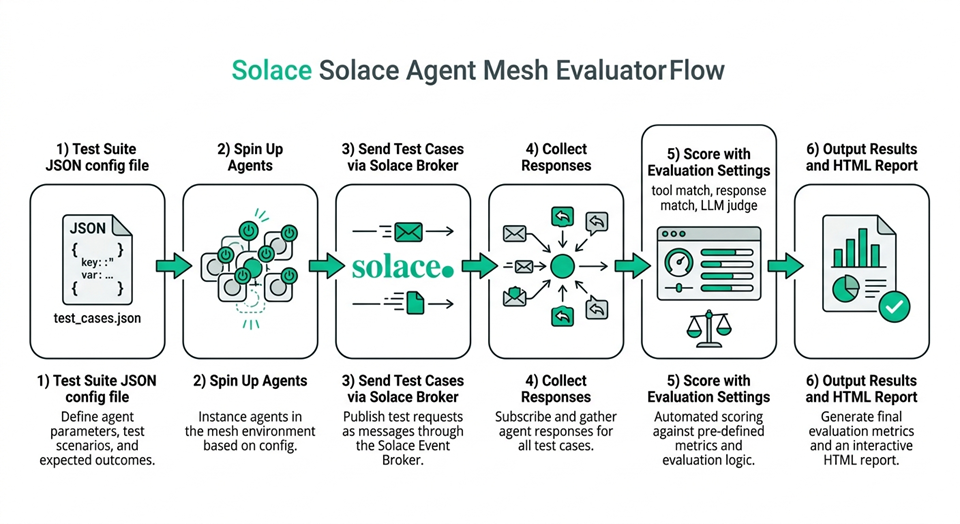
There are three building blocks:
- Test Case: A single JSON file describing one scenario. It includes the prompt, any file attachments (artifacts), which agent to target, and the criteria for a successful outcome.
- Test Suite: A JSON file that groups one or more test cases into a single run. It also defines the environment: which agents to start, which LLM models to use, broker connection details, and how many times to run each test.
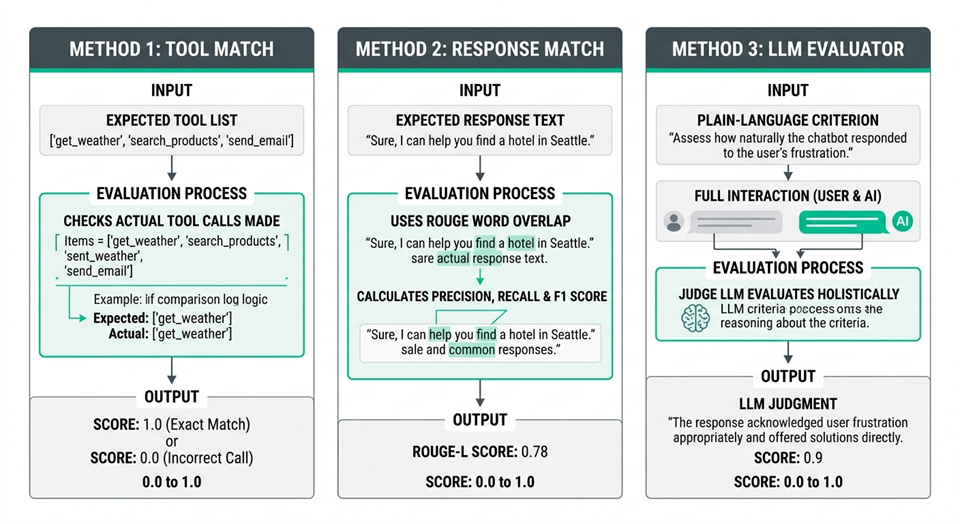
- Evaluation Settings: A configuration block inside the test suite that specifies how to score results. There are three scoring methods, and you can use any combination of them:
| Method | How it works | Best for |
|---|---|---|
| Tool Match | Checks whether the agent called the tools listed in expected_tools | Verifying correct tool usage |
| Response Match | ROUGE score comparing the actual response to expected_response | Factual responses, extraction tasks |
| LLM Evaluator | A separate LLM judges the full interaction against your criterion | Complex, holistic quality assessment |
On ROUGE
Recall-Oriented Understudy for Gisting Evaluation (ROUGE) measures word overlap between two pieces of text. It’s a common NLP metric, good for catching when agents produce the right words, but it won’t catch a correct-but-differently-worded answer. That’s where LLM Evaluator picks up the slack.
How to Evaluate AI Agents with Solace Agent Mesh
Agent Mesh Vibe Coding
If you build with an AI assistant you can add the Solace Agent Mesh Context server to provide much-needed context to your process of building Solace Agent Mesh evaluations
Let’s look at three test cases that map to the most common evaluation patterns, all from the Solace Agent Mesh repo at tests/evaluation/test_cases/.
Setting Up Your First Test Case
The simplest possible test. Does the agent respond to a greeting?
{
  "test_case_id": "hello_world",
  "category": "Content Generation",
  "description": "A simple test case to check the basic functionality of the system.",
  "query": "Hello, world!",
  "target_agent": "OrchestratorAgent",
  "wait_time": 30,
  "evaluation": {
    "expected_tools": [],
    "expected_response": "Hello! How can I help you today?",
    "criterion": "Evaluate if the agent provides a standard greeting."
  }
}
A few things worth noting here:
target_agentmust match the agent’s display name as configured in your Solace Agent Mesh setupexpected_toolsis empty, meaning this test doesn’t expect any tool calls, just a conversational responsewait_timeis 30 seconds, which is generous for a simple greeting but is fine as a baselinecriterionis the plain-language instruction passed to the LLM Evaluator if you have it enabled
This kind of test is your canary. If it fails, something is fundamentally broken with your agent setup, and you want to know that before anything else.
Evaluating Multi-Agent Orchestration
This test verifies that the orchestrator correctly delegates to a peer agent when asked to process a file.
{
  "test_case_id": "convert_pdf_to_md",
  "category": "Orchestration",
  "description": "A test case to convert a PDF file to markdown.",
  "target_agent": "OrchestratorAgent",
  "query": "Please convert the attached PDF file to markdown using the Markitdown Agent.",
  "artifacts": [
    {
      "type": "file",
      "path": "artifacts/sample.pdf"
    }
  ],
  "wait_time": 120,
  "evaluation": {
    "expected_tools": ["peer_MarkitdownAgent"],
    "expected_response": "I have converted the PDF file to markdown and attached it.",
    "criterion": "Evaluate if the agent successfully uses the MarkitdownAgent to convert the PDF file to a markdown file and confirms task completion."
  }
}
The jump in complexity here is meaningful:
artifacts: a real PDF file is attached, just like a user would upload one in the UI. Paths are relative to the test suite config file locationwait_timeis now 120 seconds, reflecting that multi-agent orchestration takes longerexpected_toolsincludes peer_MarkitdownAgent, which is how the orchestrator delegates to a peer agent. If it never calls that peer, the tool match score will be 0- The
criterionis more specific: it asks the LLM Evaluator to check for both the delegation and a confirmation of task completion
This test validates an entire agent-to-agent delegation path in a multi-agent system, not just a single response — the crux of multi-agent evaluation and one of the hardest parts of evaluating agentic AI.
Evaluating Tool Use and Function Calls
This one tests whether the agent makes the right tool call to process structured data from an artifact — the core of how you evaluate AI agents that depend on tools.
{
  "test_case_id": "filter_csv_employees_by_age_and_country",
  "category": "Tool Usage",
  "description": "A test case to filter employees from a CSV file based on age and country.",
  "target_agent": "OrchestratorAgent",
  "query": "From the attached CSV, please list the names of all people who are older or equal to 30 and live in the USA.",
  "artifacts": [
    {
      "type": "file",
      "path": "artifacts/sample.csv"
    }
  ],
  "wait_time": 120,
  "evaluation": {
    "expected_tools": ["extract_content_from_artifact"],
    "expected_response": "The person who is 30 or older and lives in the USA is John Doe.",
    "criterion": "Evaluate if the agent correctly filters the CSV data."
  }
}
This test has a deterministic expected response. There’s one correct answer (John Doe), which makes both the Response Match and LLM Evaluator scores very meaningful here. It also checks that the agent uses extract_content_from_artifact rather than trying to invent a workaround.
Building an Evaluation Dataset
Individual test cases are the raw material; an evaluation dataset is the structured collection you run them from. Aim for coverage, not volume. A useful dataset includes a representative slice of real user requests, each paired with a ground-truth response or a clear success criterion so scoring has something to measure against.
Deliberately include the hard cases: edge cases that sit near a decision boundary, known failure modes you’ve seen in production, and multi-hop scenarios where the agent has to chain several tools or delegate across peer agents. These are where regressions hide. Version your dataset alongside your agent config so a change to one is always evaluated against the other, and grow it over time as your AI agents evolve — every production incident is a new test case waiting to be written.
Running a Test Suite
Individual test cases don’t run on their own. You group them into a Test Suite and run the whole thing with sam eval.
Here’s a local test suite that covers all three examples above (plus more), tested across multiple LLM models:
{
  "agents": [
    "examples/agents/a2a_agents_example.yaml",
    "examples/agents/a2a_multimodal_example.yaml",
    "examples/agents/orchestrator_example.yaml"
  ],
  "broker": {
    "SOLACE_BROKER_URL_VAR": "SOLACE_BROKER_URL",
    "SOLACE_BROKER_USERNAME_VAR": "SOLACE_BROKER_USERNAME",
    "SOLACE_BROKER_PASSWORD_VAR": "SOLACE_BROKER_PASSWORD",
    "SOLACE_BROKER_VPN_VAR": "SOLACE_BROKER_VPN"
  },
  "llm_models": [
    {
      "name": "azure-gpt-4o",
      "env": {
        "LLM_SERVICE_PLANNING_MODEL_NAME": "openai/azure-gpt-4o",
        "LLM_SERVICE_ENDPOINT_VAR": "LLM_SERVICE_ENDPOINT",
        "LLM_SERVICE_API_KEY_VAR": "LLM_SERVICE_API_KEY"
      }
    },
    {
      "name": "gemini-3-pro-preview",
      "env": {
        "LLM_SERVICE_PLANNING_MODEL_NAME": "openai/gemini-3-pro-preview",
        "LLM_SERVICE_ENDPOINT_VAR": "LLM_SERVICE_ENDPOINT",
        "LLM_SERVICE_API_KEY_VAR": "LLM_SERVICE_API_KEY"
      }
    }
  ],
  "results_dir_name": "my-eval-run",
  "runs": 3,
  "workers": 4,
  "test_cases": [
    "tests/evaluation/test_cases/hello_world.test.json",
    "tests/evaluation/test_cases/convert_pdf_to_md.test.json",
"tests/evaluation/test_cases/filter_csv_employees_by_age_and_country.test.json"
  ],
  "evaluation_settings": {
    "tool_match": { "enabled": true },
    "response_match": { "enabled": true },
    "llm_evaluator": {
      "enabled": true,
      "env": {
        "LLM_SERVICE_PLANNING_MODEL_NAME": "openai/gemini-3-pro-preview",
        "LLM_SERVICE_ENDPOINT_VAR": "LLM_SERVICE_ENDPOINT",
        "LLM_SERVICE_API_KEY_VAR": "LLM_SERVICE_API_KEY"
      }
    }
  }
}
A few things worth calling out:
agentslists the YAML configs for any agents the framework needs to start locally. This is what makes it a local eval run vs. a remote oneruns: 3runs each test case 3 times. Agent behavior has variance; a single run isn’t enough to draw conclusionsworkers: 4runs tests in parallel to keep things fast- The
llm_evaluatoruses a different model than the agents under test. This is intentional: your judge shouldn’t be the same model as the one being judged
To run it:
sam eval tests/evaluation/my_suite.json
# or with verbose output to see full message traces
sam eval tests/evaluation/my_suite.json --verbose
The framework starts your agents, submits each test case via the Solace broker, collects responses, scores everything, and writes results to the results/ directory. You get a per-test JSON summary and an HTML report with visual charts.
Local vs. Remote
The suite above runs agents locally, which is great for development and model comparisons. If you want to evaluate against an already-running Solace Agent Mesh deployment (staging, production), swap agents and llm_models for a remote block pointing at your instance’s REST gateway. The test cases themselves stay exactly the same.
Reading Your Results
Running sam eval produces two things: a summary printed to the terminal when the run finishes, and a results/ directory with everything stored in detail.
What you get in the terminal
As soon as the run completes you’ll see a table like this, averaged across all runs per test case:
Model                     | Test Case                               | Tool Match | Response Match | LLM Eval
------------------------------------------------------------------------------------------------------------------
bedrock-claude-4-5-sonnet | filter_csv_employees_by_age_and_country | 0.00       | 0.03           | 0.00
bedrock-claude-4-5-sonnet | convert_pdf_to_md                       | 0.00       | 0.04           | 0.00
bedrock-claude-4-5-sonnet | hello_world                             | 1.00       | 0.00           | 0.00
gpt-4-1                   | convert_pdf_to_md                       | 1.00       | 0.25           | 1.00
gpt-4-1                   | hello_world                             | 1.00       | 0.53           | 0.67
gpt-4-1                   | filter_csv_employees_by_age_and_country | 0.00       | 0.34           | 0.30
This gives you a quick read on where things stand. For anything that looks wrong, the full detail is in the results/ directory.
What’s in the results directory
results/sam-local-eval-test/
├── report.html               # Visual HTML report
├── stats.json                # Aggregated scores for all models and test cases
├── gpt-4-1/
│   ├── results.json          # Per-run scores and LLM judge reasoning
│   ├── task_mappings.json
│   ├── hello_world/
│   │   ├── run_1/
│   │   ├── run_2/
│   │   └── run_3/
│   └── convert_pdf_to_md/
│       └── ...
└── bedrock-claude-4-5-sonnet/
└── ...
The HTML report is where you’ll spend most of your time. It shows benchmark run info, which models were tested, and LLM evaluation scores broken down by task category. Here’s what ours looked like:
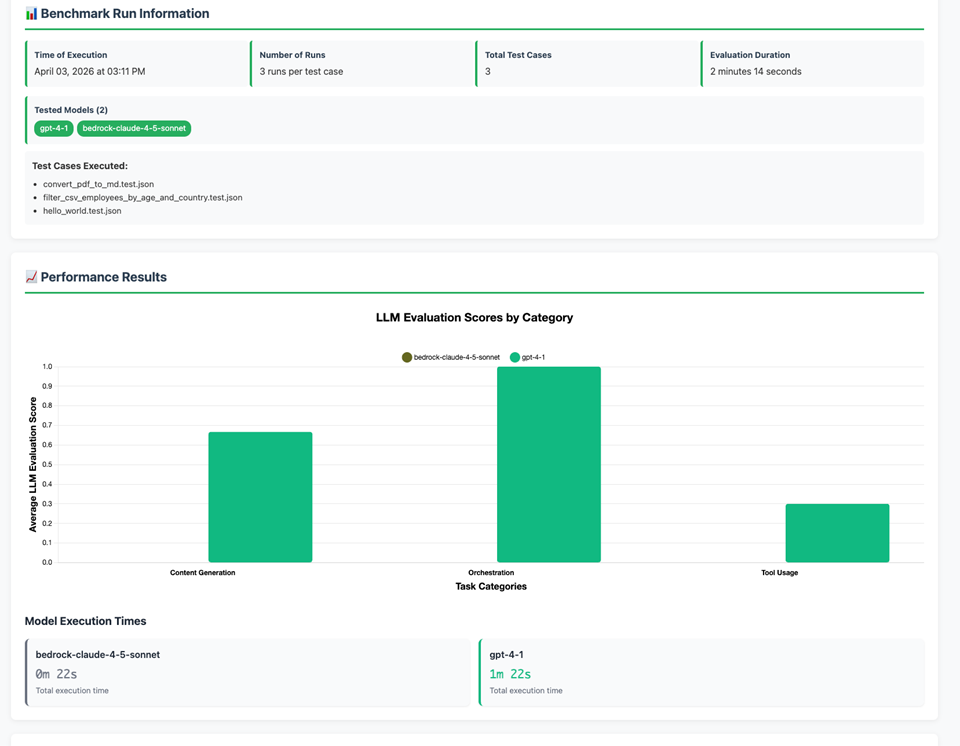
The per-model results.json>/code> files go deeper: every run gets its own scores plus the full LLM judge reasoning as plain text. That reasoning is genuinely useful when a score surprises you.
Interpreting what the scores are telling you
The three scores serve different purposes and, read together, give you a rounded picture of agent performance; read in isolation, any one can mislead.
- Tool Match is binary and unforgiving. Either the agent called the expected tool or it didn’t. A score of 0.00 means the tool was never used across any run. For
bedrock-claude-4-5-sonnet, bothconvert_pdf_to_mdandfilter_csv_employees_by_age_and_countryscored 0.00 on tool match, which tells us immediately that the model failed to delegate topeer_MarkitdownAgentand failed to callextract_content_from_artifact. Something is broken at the instruction-following level for this model in this agent configuration. - Response Match (ROUGE) is a weaker signal that can mislead. Notice that
gpt-4-1onhello_worldscores 0.53 for response match but 0.67 for LLM eval. The agent responded with “Hello! How can I assist you today?” rather than “Hello! How can I help you today?” — the word “assist” vs “help” tanks the ROUGE score even though the response is perfectly correct. This is exactly why ROUGE alone is not enough: it measures word overlap, not meaning. Always cross-reference with LLM eval. - LLM Evaluator gives you the most actionable signal, and the reasoning explains why. For
gpt-4-1onfilter_csv_employees_by_age_and_country, the three runs scored 0.0, 0.6, and 0.3 respectively (average 0.30). The LLM judge’s reasoning on the 0.6 run explains it well:
“The agent ultimately provides the correct answer (John Doe). However, the response is confusing and initially incorrect. The agent’s first sentence is factually wrong… it then contradicts itself…” That’s not a pass. The agent eventually got to the right answer but only after stating the wrong one. The LLM judge caught that nuance. ROUGE didn’t.
Low Response Match doesn’t always mean failure
A 0.25 response match on convert_pdf_to_md alongside a 1.00 LLM eval score is normal. The agent returned a confirmation message worded differently from the expected_response, but the LLM judge correctly recognized that it successfully completed the task. Set your expected_response to represent the spirit of the answer, and let LLM eval handle the quality judgment.
Using results to build confidence over time
A single agent evaluation run gives you a snapshot. Running evals consistently over time is what turns that snapshot into real confidence in agent performance.
- After agent changes: any time you modify agent instructions, add a tool, or change how your AI agents delegate, re-run the suite before deploying. A drop in tool match scores is a reliable early warning that your instruction changes broke something in the agent’s reasoning. A drop in LLM eval scores points to response quality degradation.
- After model updates: models change under you. If your LLM provider pushes an update to a model you’re using in production, run your eval suite against it before cutting over. The
bedrock-claude-4-5-sonnetresults here are a good example of this: the model greets correctly (hello_worldtool match 00) but completely fails at tool delegation and data processing. Without evals, you wouldn’t know that until a user complained. - Tracking variance: the json file stores score distributions (min, Q1, median, Q3, max) for every test case, not just averages. If a test case scores 1.0, 1.0, 0.0 across three runs, the average is 0.67 but the 0.0 run is a real problem. Watch the distribution, not just the mean. A model that fails 1 in 3 times is not production-ready for that task.
- Building a baseline: run your suite when your agents are working well, and save those results as a baseline. Future runs can be compared against it. Scores drifting downward on tasks that used to pass consistently is a signal worth investigating, even if the average is still technically above your threshold.
What “good enough” looks like
For tool-dependent tasks — anything hinging on a correct tool call — aim for tool match 1.00 consistently. For LLM eval, a score above 0.8 averaged across 3 runs is a reasonable production bar for most tasks, though you should set your own thresholds based on how critical each task is. For response match, treat anything below 0.5 as a prompt to check the LLM eval score before drawing conclusions.
Model Comparison Evals
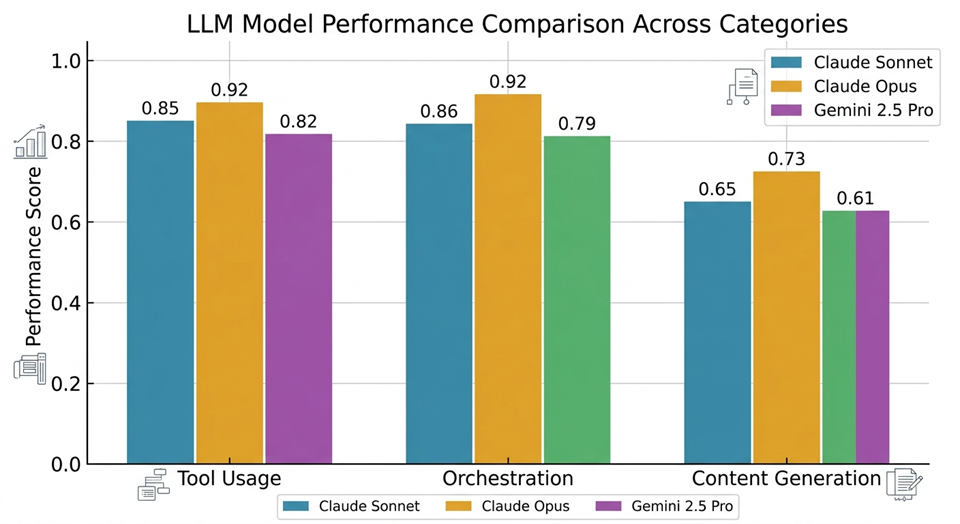
This is where the Solace Agent Mesh eval framework earns its keep. Most eval tools test one model. Solace Agent Mesh runs your entire test suite against every model you specify in a single command, then renders a side-by-side comparison in the HTML report.
This matters because model choice is rarely a one-time decision. Models get updated, costs change, and new models ship that might outperform what your AI agents currently use for specific tasks. To compare Claude Sonnet, Claude Opus, and Gemini, add them all to llm_models:
"llm_models": [
  {
    "name": "claude-sonnet-4-6",
    "env": {
      "LLM_SERVICE_PLANNING_MODEL_NAME": "anthropic/claude-sonnet-4-6",
      "LLM_SERVICE_ENDPOINT_VAR": "LLM_SERVICE_ENDPOINT",
      "LLM_SERVICE_API_KEY_VAR": "LLM_SERVICE_API_KEY"
    }
  },
  {
    "name": "claude-opus-4-6",
    "env": {
      "LLM_SERVICE_PLANNING_MODEL_NAME": "anthropic/claude-opus-4-6",
      "LLM_SERVICE_ENDPOINT_VAR": "LLM_SERVICE_ENDPOINT",
      "LLM_SERVICE_API_KEY_VAR": "LLM_SERVICE_API_KEY"
    }
  },
  {
    "name": "gemini-2.5-pro",
    "env": {
      "LLM_SERVICE_PLANNING_MODEL_NAME": "openai/gemini-2.5-pro",
      "LLM_SERVICE_ENDPOINT_VAR": "LLM_SERVICE_ENDPOINT",
      "LLM_SERVICE_API_KEY_VAR": "LLM_SERVICE_API_KEY"
    }
  }
]
The framework runs the full suite once per model, giving you a clean read on agent performance across every model. The HTML report shows each model’s scores broken down by test category, so you can see, for example, that Opus edges out Sonnet on holistic quality scores for complex orchestration tasks, while Sonnet and Gemini are comparable on straightforward tool usage tests.
Some practical guidance for getting clean comparisons:
- Use at least 3 runs per model. One run is not a data point; it’s a coin flip
- Keep your LLM Evaluator model separate from the models under test. Pick a stable, strong model you’re not comparing (e.g. GPT-4o or Gemini 2.5 Pro) as the judge
- Organize test cases by
category: the HTML report groups scores bycategory>/code>, so you'll get more actionable charts if your categories are meaningful - Watch for
variance, not just average scores. A model that scores 0.9 on average but has high variance between runs is less reliable than one that consistently scores 0.8
How to Audit AI Agents in Production
Evaluation doesn’t stop at launch. Once your AI agents are in production, the ground shifts underneath it: model providers push updates, prompts get tweaked, tools are added or swapped, and config drifts as your team iterates. Any one of these can change what the agent does without throwing an error. Auditing AI agents in production means running your agent evaluation suite continuously so you catch those shifts before your users do.
- Run after every change. Treat sam eval as a required step after any agent config change, prompt edit, or tool addition — the same way you would run a test suite before merging code.
- Wire it into CI/CD. Add the eval run to your pipeline so a pull request that degrades tool-match or LLM-eval scores fails automatically instead of shipping.
- Set thresholds and alert on drift. Decide the minimum acceptable score per task, then flag any run that drops below it, or any task whose variance widens across runs. A metric that used to sit at 1.00 and now scores 0.70 is your early warning.
- Re-baseline after intentional changes. When you deliberately upgrade a model or rework an agent, capture a fresh baseline so future comparisons stay meaningful.
For the full set of configuration options — remote evaluation mode, artifact types, and field references — see the Solace Agent Mesh evaluation documentation.
Key Points
- AI agent evaluation is the practice of testing, measuring, and verifying what an agent actually does against defined success criteria — the AI equivalent of an integration test. It matters because agents fail silently: model updates, tool changes, and config drift shift behavior without throwing errors.
- The metrics that matter most are tool-call accuracy, task completion, response quality (ROUGE), and LLM-as-a-judge scoring.
- Run evals after every config change and model update; and compare models side by side before committing one to production.
- Solace Agent Mesh builds evals into its CLI — define a test case, group cases into a test suite, and run sam eval against real agents on a real broker.
What’s Next
AI agent evaluation is what separates confidence from guesswork. A working eval suite turns “seems to work” into evidence you can point to — and keeps it true as your agents and models change.
Solace Agent Mesh evaluations documentation covers all the configuration options in detail, including remote evaluation mode, artifact types, and full field references.
The example test cases shown in this post (hello_world, convert_pdf_to_md, filter_csv_employees_by_age_and_country, and the rest) are all available in the Solace Agent Mesh GitHub repo. Clone it, run the examples, and start adapting them for your own agents.
Start with hello_world – it’ll tell you more than you expect!
Frequently Asked Questions
What is AI agent evaluation?
AI agent evaluation is the practice of testing, measuring, and verifying an AI agent’s behavior against defined success criteria. It answers a simple question — given this input, does the agent do the right thing? — using repeatable tests rather than one-off impressions.
How do you evaluate AI agents?
You evaluate AI agents by running representative inputs through the agent and scoring the results against expectations. In practice that means combining tool-call accuracy, task completion, response-quality metrics like ROUGE, and an LLM-as-a-judge for holistic quality. Solace Agent Mesh runs these checks against real agents on a real broker with a single sam eval command.
What metrics matter most for AI agent evaluation?
For tool-using agents, tool-call accuracy and task completion are the highest-signal metrics. Response-quality scores and LLM-as-a-judge ratings assess how good the final answer is, while latency and cost gauge production readiness. Read them together — no single score tells the whole story.
How often should you run agent evals?
Run evals continuously, not just at launch. Re-run your suite after every agent config change, prompt edit, tool addition, or model update, and wire sam eval into your CI/CD pipeline so regressions fail the build instead of reaching users.
Explore other posts from categories: Artificial Intelligence | For Developers




Subscribe to Our Blog
Get the latest trends, solutions, and insights into the event-driven future every week.