
TL;DR: New decision nodes in Agent Mesh let you implement AI decision models as part of your workflows by calling TypeSafe’s Jev or GPT-6 Luna Decisions on OpenAI’s Decisions API. An AI decision model can answers structured/typed questions with calibrated confidence, in about 200 milliseconds, for a fraction of a cent, and answers with uncertainty are escalated to a frontier LLM.
Look closely at almost any agentic workflow and you will find steps where nothing needs to be written. Which team owns this ticket? Is this document privileged? Is this incident severe enough to page someone? Should this request go to the expensive model?
These are decisions. Today most of us make them with large language models (LLM): we prompt a frontier model to classify the input, ask it for JSON, parse the answer, and branch on a string. It works, but we pay generation-level latency and cost for what is really a lookup of judgment, and we get no signal for the cases where the model was guessing.
Agent Mesh workflows now have a dedicated node type to optimize for these moments. First, I’ll explain what AI decision models are, how they work, and when to use them.
What is an AI Decision Model?
Unlike large language models (LLMs) that respond to requests by writing text, AI decision models do not write their own text. You give them some event, state change or piece of data (e.g. a ticket, a call transcript, a page of a contract, a photo) and a set of structured/typed questions, each with a fixed answer format. The decision model returns typed answers in those predefined formats, with probabilities, in a single call. There are three kinds of questions:
- Choice:
Which team should own this ticket?
choice: "billing"

probabilities: billing 0.97, technical 0.02 …

confidence: 0.96 - Boolean
The ticket needs an answer today.
value: true

probability: 0.84 - Score
How severe is the problem? low · medium · high
score: 1.96 of 2

legend: 0 low, 1 medium, 2 high

confidence: 0.94
If you know LLMs well, think of an AI decision model as a classifier you configure in plain language at call time. You write the question and describe each option, and you can ask many questions about the same input in one call, so routing a ticket and flagging it as urgent cost the same as doing either one. Since the answer is a probability distribution, you get a confidence number your code can act on.
Large language models use a chat model that produces generated text, so its answer space is open-ended: it can say anything, and your code has to parse the reply. A decision model’s answer space is fixed by the questions you define, so every answer arrives as a typed value with a probability. That is how one call can replace a prompt, a JSON parse, and a branch on a string.
When Should you use a Decision Model?
- Routing and triage. Which queue, desk, agent, or workflow branch should handle this?
- Classification at volume. Tagging every support case, call segment, or review with a product area, sentiment, or signal type.
- Policy and compliance gates. Does this contain personal data? Is this page potentially privileged? Does this request need a human?
- Scoring. Severity, priority, churn risk, or frustration on a scale you define.
- Visual inspection. With a model that reads images: how badly is the part in this photo damaged, and is this scanned page an invoice?
When Should You Not Use a Decision Model?
Decision models are the wrong tool for open-ended reasoning, multi-step tool use, or anything that needs to write prose. TypeSafe’s own guidance adds that Jev is weak at arithmetic and date comparison and answers the question you literally asked. That is why the pattern below pairs them with LLMs instead of replacing them.
What Are Decision Nodes in Solace Agent Mesh?
Solace offers an agent development and runtime platform called Solace Agent Mesh that lets you build, test, deploy, observe and improve every agent through one lifecycle. Use any model, any cloud.
Within Agent Mesh, a workflow is a graph you define in YAML or build in the Agent Mesh UI, consisting of agent nodes, tool nodes, switches, maps, and loops that are run by the engine in a defined order.
A decision node is how an Agent Mesh workflow uses a decision model: it sends part of the workflow’s data to the model, asks your questions, and routes on the answers, which makes it a natural fit for LLM routing in an AI agent workflow.
What Does a Decision Node Look Like?
Here is a support-ticket triage, the example from our documentation. Every choice option maps to a downstream node. Answers below min_confidence go to the escalate node. The other answers, such as urgent, are available to every node after it.
decision:
  model_alias: ticket-router        # a decision model registered on the Models page
nodes:
  - id: triage
    type: decision
    input:
      ticket: "{{workflow.input.ticket}}"
    questions:
      department:
        type: choice
        instructions: Which team should own this ticket?
        criteria:
          billing: Payment, invoice, or refund issues
          technical: Bugs, errors, or outages
          other: Anything else
      urgent:
        type: Boolean
        instructions: The ticket needs an answer today.
    route_on: department
    routes:
      billing: billing_desk
      technical: tech_desk
    default: general_desk         # catches "other"
    min_confidence: 0.8           # below this, the decision escalates
    escalate: review              # an LLM agent that handles the hard ones
Here is a visualization of the same workflow:
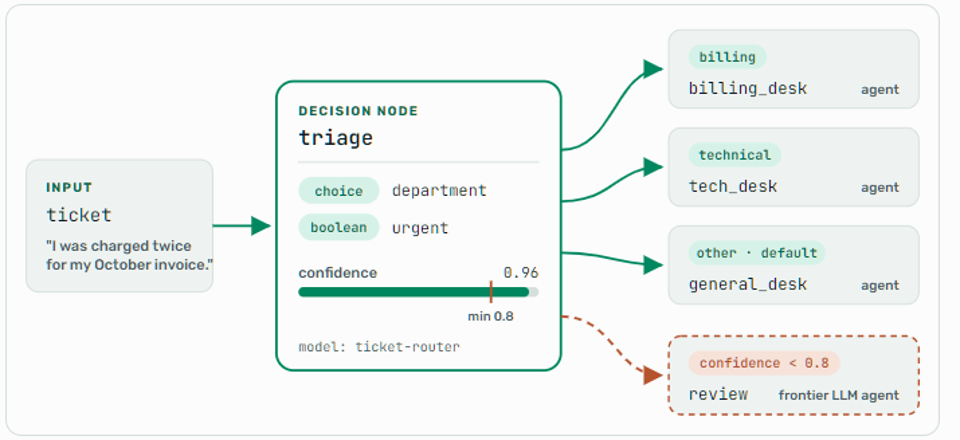
Solid paths are confident answers, routed directly in one decision call. The dashed path is an escalation: an answer below min_confidence goes to the review agent instead.
Solid paths are confident answers, routed directly in one decision call. The dashed path is an escalation: an answer below min_confidence goes to the review agent instead.
The workflow owns the control flow; the model only makes the narrow call. That split gives you a few things that are hard to get from a classify-then-switch pattern:
- Confidence-gated escalation to an LLM. Uncertain answers go to a stronger node. With >copde>
escalation_mode: reroute(the default), the escalation node answers the same question and the workflow takes the route it picks. Withhandoff, the escalation node finishes the job itself, for example a frontier agent or a human-review step. - Graceful provider failure. With
on_provider_error: escalate, a timeout or rate limit escalates instead of failing the run. - Loud configuration errors. A route key that is not an option, or an option with no route and no default, fails the workflow when it loads rather than at 2 a.m.
- Visibility. The Activities view shows the answer the model chose and its confidence, and dims the branches it did not take.
You do not have to write the YAML by hand either. When a deployment has a decision model registered, Quick Build proposes a decision node for classify-and-route steps it would otherwise build from an agent and a switch.
What Does a Decision Workflow Look Like in Agent Mesh?
Here is that workflow running in Agent Mesh against Jev, with the two tickets from the benchmark below. In the workflow view, every branch carries the option it serves, and the escalation path carries its threshold:
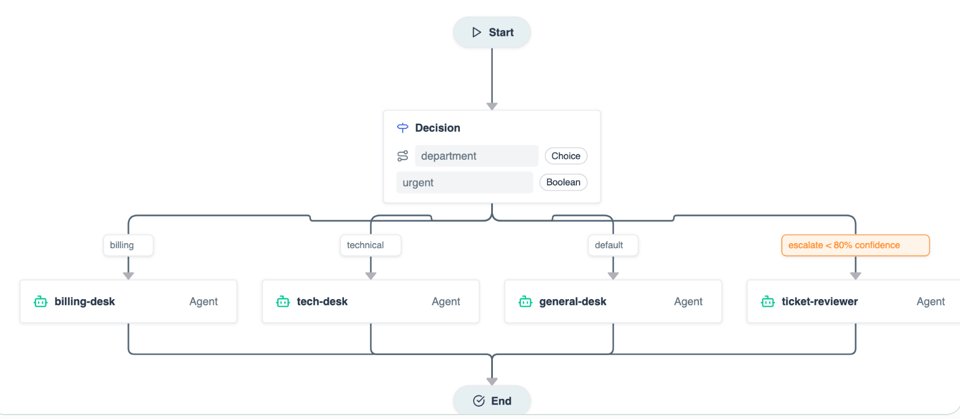
The ticket-triage workflow from the example above, as Agent Mesh draws it.
When a run reaches the decision node, the Activities view shows what the model answered, how confident it was, and which branch ran. A clear ticket routes in one decision call:
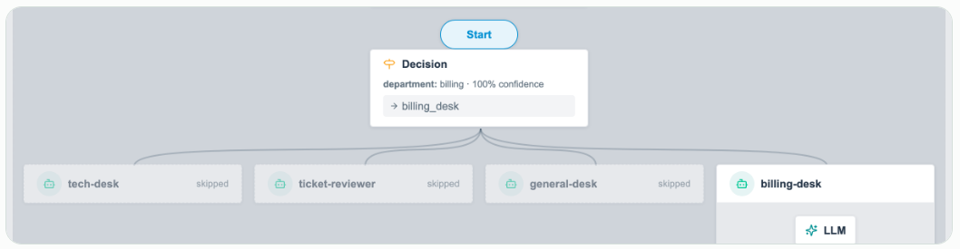
“I was charged twice for my October invoice…” Jev answers billing at 100% confidence, the billing desk runs, and every other branch is skipped.
The ambiguous ticket takes the other path:
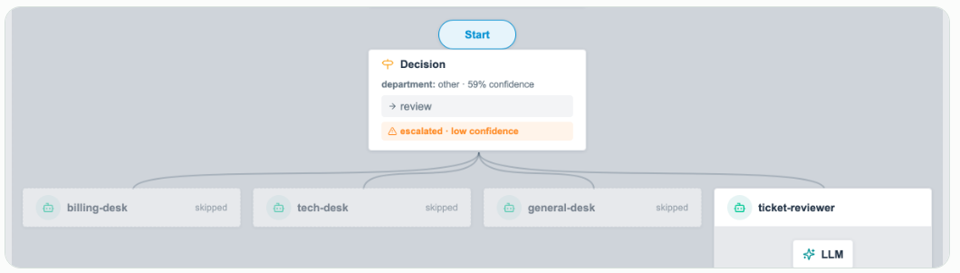
“We’re downsizing and need to remove 30 seats before renewal…” Jev’s best answer is other at 59% confidence, below the 0.8 threshold. The node escalates, all three desks are skipped, and the reviewer agent answers the ticket.
To see decision models in action within Solace Agent Mesh, watch this demo.
AI Decision Making Tools: Support for Two Top Decision Models
Decision nodes are provider-agnostic, and Agent Mesh works with two of the leading decision-model providers today, so you bring your own account and key for either one:
- TypeSafe, with its Jev models, called directly or through OpenRouter. . The TypeSafe provider takes any API base URL, so it also works through pass-through services such as OpenRouter, and with open-weight decision models that you host yourself behind the same API. Self-hosted models keepA self-hosted model keeps the decision input on infrastructure you control.
- OpenAI’s Decisions API, with GPT-6 Luna Decisions (
gpt-6-lunaon the Decisions API,openai/gpt-6-luna-decisionsthrough OpenRouter). This is OpenAI’s decision model, which returns typed answers and probabilities. It is a different thing from calling the general-purpose GPT-6 Luna LLM through OpenAI’s other APIs. It reads images, and it can decline to answer a question, which Agent Mesh treats as a failure the node can escalate.
In either case, you write the same boolean, choice, and score questions, and the node’s output has the same fields. The workflow names a model by its alias, and the alias lives on the Models page with its provider, endpoint, and key. Switching a workflow from Jev to GPT-6 Luna Decisions is an edit to one model configuration. No workflow changes.
How do Decision Models Handle Images?
GPT-6 Luna Decisions reads images as well as text, on OpenAI’s Decisions API and through OpenRouter. A decision node lists image artifacts in its images field, such as a photo a customer uploaded, a scanned page, or a screenshot an earlier node captured, and the model answers its questions about the images and the input together. That opens up decisions an LLM pipeline would need a vision model and a parsing step for:
- How badly is the returned part in this photo damaged?
- Is this scanned page an invoice, a purchase order, or something else?
- Does this screenshot show an error dialog?
Agent Mesh accepts PNG, JPEG, and WebP files, sends up to five images and 20 MB per call by default, and downscales very large images before sending them. Jev reads images too, but through TypeSafe’s own image format, which Agent Mesh does not send yet. Until it does, Agent Mesh refuses to send images to Jev rather than let it answer without seeing them.
Here a node grades a photo that an earlier tool node saved:
- id: grade_damage
  type: decision
  images:
    - "{{inspect.output.created_artifact}}"   # a photo an earlier tool node saved
  questions:
    damage:
      type: choice
      instructions: How badly is the part in the photo damaged?
      criteria:
        none: No visible damage
        minor: Scratches or dents that do not affect how the part works
        major: Cracked, bent, or broken
How Fast are Agent Mesh Decision Nodes?
We wanted to measure the performance of our decision nodes the way you would use the feature, so we wrote 40 support tickets with known answers: 32 clear-cut and 8 deliberately ambiguous. Then we asked the same three questions (department, urgent, severity) about each ticket three times through four models: two decision models, and two Claude models making the classify call the way a workflow would today, with structured JSON output. Here are the results:
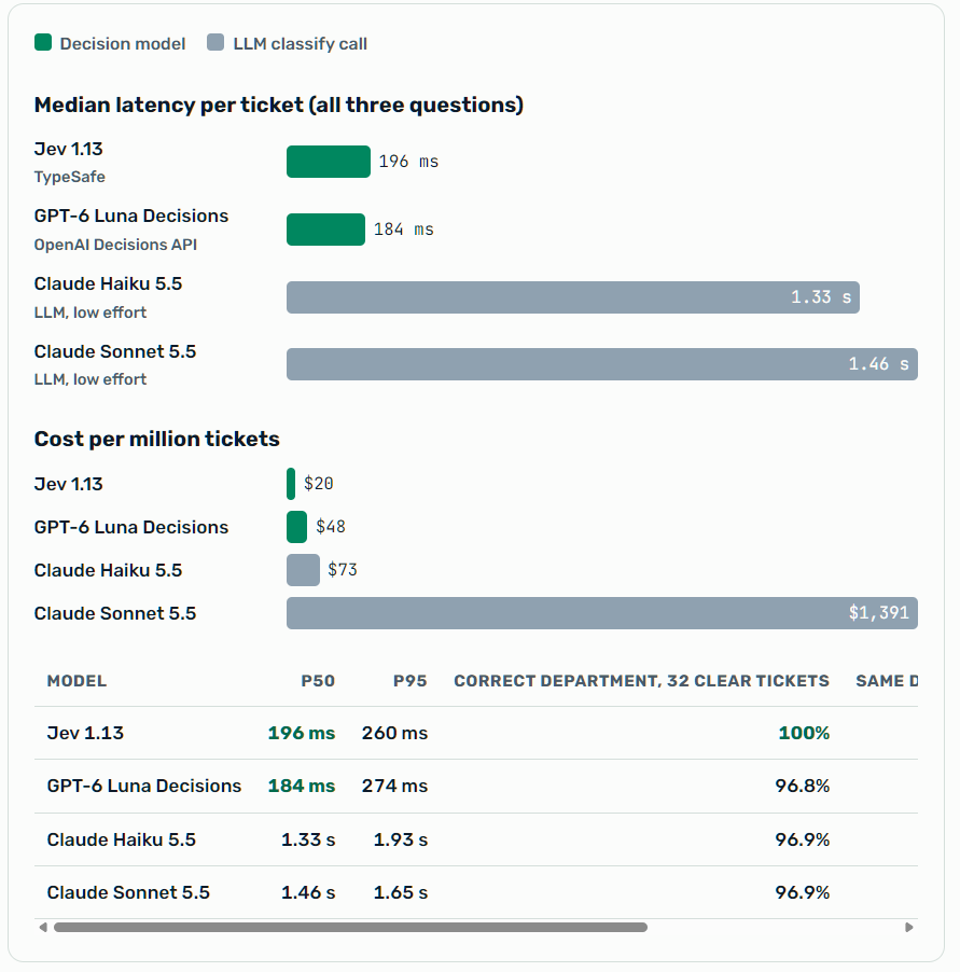
As you can see, on clear-cut tickets the decision models were as accurate as the LLMs and about seven times faster. Jev was 3.6 times cheaper than Haiku 5.5 and 68 times cheaper than Sonnet 5.5. All four models gave the same department on all three runs of every ticket. The gap that matters most shows up on the hard ones.
Why Does Confidence Calibration Matter for Decision Models?
Here is one of the ambiguous tickets, and what each model said:
“We’re downsizing and need to remove 30 seats before renewal. What happens to their data?”
- Jev 1.13
account
confidence 0.28 - GPT-6 Luna Decisions
billing
confidence 0.35 - Claude Haiku 5.5
account
no signal - Claude Sonnet 5.5
billing
no signal
The two LLMs disagreed with each other, and both answered with the same certainty they bring to every other ticket. Both decision models told us they were unsure. Across the whole set, Jev’s average confidence was 0.96 on the clear tickets and 0.76 on the ambiguous ones. At a min_confidence of 0.8 it would escalate half of the ambiguous tickets and only 6% of the clear ones, and it was right on 97% of the answers it kept.
Decision models and frontier LLMs complement each other, and pairing them lets each do what it does best: decision models handle most items quickly and cheaply, and frontier models handle the exceptions. The combination of speed, cost efficiency, and confidence this approach offers can change the economics of your AI investment. For example, if every ticket goes to Jev and the 15% below 0.8 also go to Sonnet 5.5, the blended cost is about $229 per million tickets: roughly a sixth of sending everything to Sonnet. Most tickets are routed in about 200 milliseconds, and the frontier model spends its time only on the tickets that need it.
How We Measured
October 8, 2026, from a single client over the public internet, four requests in flight at a time. Jev 1.13 and GPT-6 Luna Decisions were called through OpenRouter’s decision endpoint, and their cost is what OpenRouter reported per call. The Claude models were called through the Messages API with structured output at low effort, and their cost is computed from token usage at list price ($0.10 and $0.50 per million input and output tokens for Haiku 5.5; $2 and $10 for Sonnet 5.5). The tickets are synthetic and the sample is small, so treat these as indicative and measure on your own data. The yes-or-no question was where wording mattered most: agreement with our “urgent” labels ranged from 74% (GPT-6 Luna Decisions) to 100% (Sonnet 5.5), so test your boolean statements before you route on them.
What Patterns Work Best for Decision Models?
Decision nodes do their best work in workflows that follow one recipe: tools fetch the data, a decision node triages every item, and an LLM writes once at the end. Three shapes come up again and again.
- Fan out, decide, write once. A
mapnode runs a decision node over every item in a batch, such as every support case from the last two weeks. Each case gets typed answers: what kind of signal it is, how frustrated the customer is, whether product should hear about it. A single LLM call then turns hundreds of typed answers into one report, instead of hundreds of LLM calls reading one case each. - Classify the parts, then act. A webhook starts the workflow when a recorded sales call is processed. The transcript is split into speaker segments, a decision node labels each one (action item, product feedback, objection, competitor mention), and one agent drafts the follow-up from the labelled segments.
- Score everything, write only where it matters. A weekly schedule scores every account for health and churn risk. Only the accounts that score at risk, or that the model is unsure about, go to an LLM for a write-up.
In each pattern the workflow names its decision model by alias, never by provider, so moving from Jev to GPT-6 Luna Decisions, or to a model you host yourself, changes one model configuration and none of the workflows.
How Do You Get Started With Decision Nodes?
Decision nodes are available now as an Early Access feature in Solace Agent Mesh, and they are enabled by default. I suggest you watch this demo to see them in action, then give it a shot. Here’s how:
- Download Agent Mesh for macOS, Windows, or Linux. It is free to try, and it runs on your own machine.
- On the Models page, choose Add Model, select the Decision model type, and pick TypeSafe or OpenAI.
- Add a decision block naming that model to a workflow, then add a decision node. Start with the ticket-triage example in Routing with Decision Nodes, part of the Agent Mesh workflow documentation.
- Run it on a sample of real inputs and check the confidence each run reports in the Activities view. Find the confidence below which answers start to go wrong, and set min_confidence slightly above it, so borderline answers escalate too.
Where Your Data Goes
A decision node sends its input, and any images, to the decision model’s provider, or to your own endpoint if you host the model. Agent Mesh sends nothing until an administrator registers a decision model and a workflow names it. Review the provider’s data-processing terms first, and pass a node only the fields its questions are about.
What’s Next for Solace Agent Mesh?
Next, we are taking the same idea to evaluations. Most of what an evaluator judges is a decision too: did the agent use the right tool, does this answer meet the rubric, is this response grounded in its sources. An AI decision model makes a answers in milliseconds, costs a fraction of a cent per case, and says when it is unsure, so an evaluation run can send only the uncertain cases to a frontier-model judge.
Ready to try decision nodes in your own workflows? Download Solace Agent Mesh and add one to a workflow today!
Frequently Asked Questions
What is an AI decision model?
An AI decision model is a model that answers structured questions about an input, such as a ticket or a photo, and returns each answer in a fixed format with a confidence score. The term has two meanings. In the broad business sense, it is any AI system that analyzes data to support decisions, predict outcomes, or apply rules and machine learning. In the narrow sense used in this post, it is a typed, structured-output model that picks an answer from a fixed set of options instead of writing text.
How is a decision model different from a large language model?
A large language model (LLM) generates open-ended text, while a decision model picks from answer options you define and reports how confident it is. In our benchmark, decision models matched the LLMs on clear-cut tickets and were about seven times faster.
What is a decision node in Solace Agent Mesh?
A decision node is a workflow step that sends data to a decision model, asks your questions, and routes the workflow on the answers. Answers below min_confidence escalate to a stronger node, such as a frontier LLM agent or a human-review step.
What is the difference between a decision engine and a rules engine?
A rules engine applies fixed if-then logic that people write and maintain. A decision engine is broader: it combines rules, models, and workflow to reach and act on a decision. A decision model fits inside a decision engine as the part that makes the judgment call, bringing learned patterns where fixed rules are too rigid, while the workflow decides what happens next. Business rules around the model, such as min_confidence thresholds and human review, keep the process compliant and safe.
Which decision models does Agent Mesh support?
Agent Mesh supports two today: TypeSafe’s Jev models and GPT-6 Luna Decisions on OpenAI’s Decisions API, called directly or through OpenRouter. TypeSafe’s provider also works with self-hosted models behind the same API. You bring your own account and key, and switching between them is a single model configuration change.
Explore other posts from category: Artificial Intelligence




Subscribe to Our Blog
Get the latest trends, solutions, and insights into the event-driven future every week.