
System monitoring answers the questions you already know to ask. This post is about the other kind: views that let you explore how your own architecture actually behaves, and that regularly show you something nobody thought to put on a dashboard. Two small tools do most of the work. Each one takes minutes to run, and together they answer a question that matters every time you change something: what exists, and who depends on it? If you design your events in Solace Event Portal, they are the runtime counterpart to what you modelled there.
A word on where the data comes from. The management plane (SEMP v2) gives you configuration and the counters the broker keeps per object. It never touches a message, and it only needs a read-only management user. The data plane is a normal subscription: you see real topics and timing, but you add load, because every matching message is also delivered to the browser, and you hold live payloads in a tool. The Sunburst uses the data plane, the Sankey the management plane.
What Is Actually Being Published: Sunburst Topic Explorer
Solace topics are hierarchical and dynamic, for example acme/sales/order/placed/v1/de/web/10042. Nothing in the broker makes you look at that hierarchy as a whole, so the big picture exists only implicitly.
The Sunburst Topic Explorer, built by my colleague Aaron Lee, makes it explicit. You connect from the browser over WebSocket with host, VPN, credentials and a topic subscription, and it renders everything arriving on that subscription as an interactive sunburst or icicle chart. Each ring is one level of the hierarchy, and the arc width is the traffic.
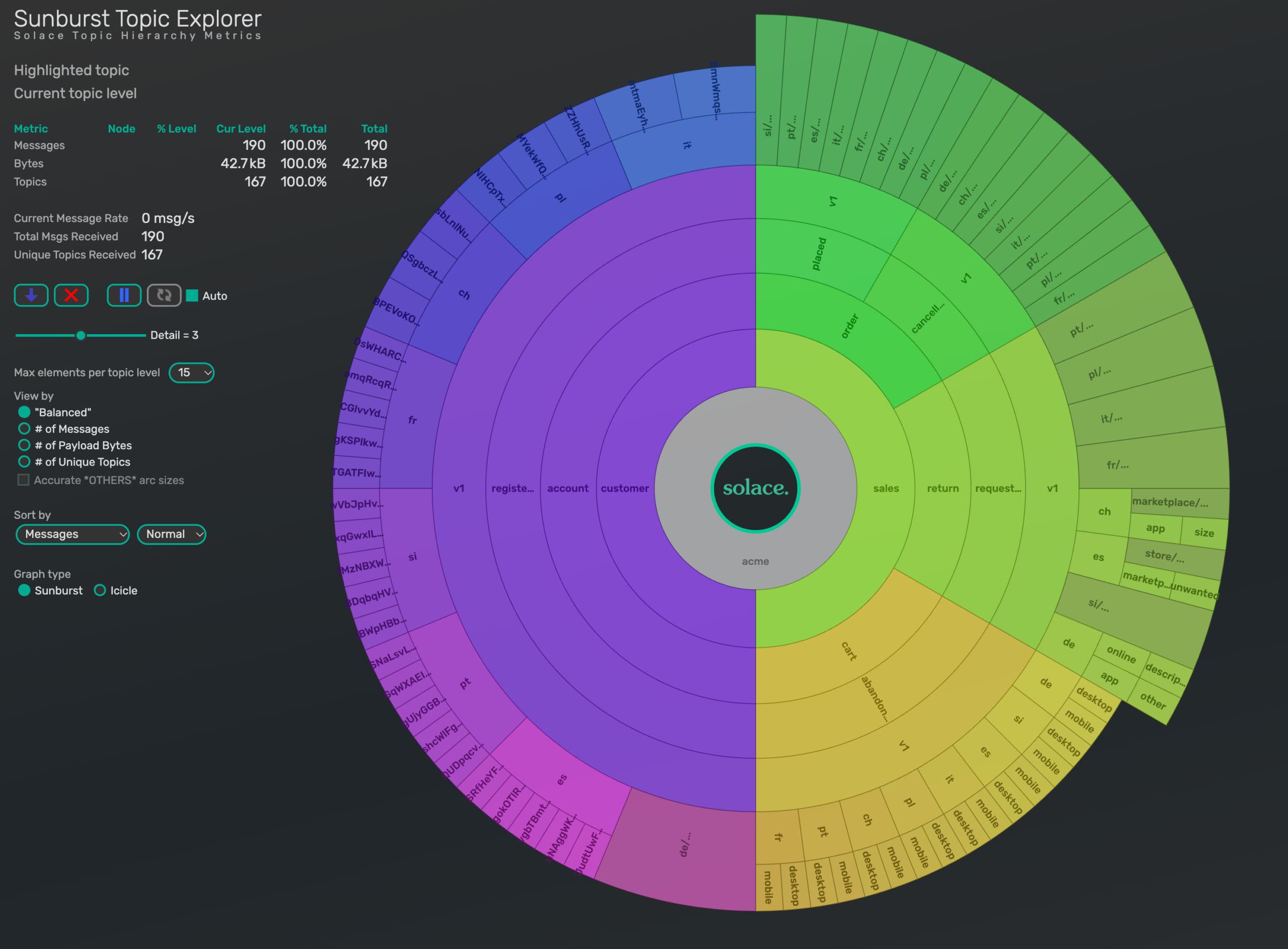
What to look for:
- Start with the domain boundaries that really exist, which are rarely the ones in the architecture diagram.
- Check message rate, volume and unique topic count per branch, so “which part of the business is busy” becomes a visual question.
- Look for governance drift: inconsistent verb tenses, a level that means region in one domain and environment in another, an order ID in the topic, like the
{orderId}level in our example below, which makes that level unbounded. That can be a deliberate design choice, but it is one you should see. If you run a Noun/Verb/Property topic standard, this is your compliance report.
Who is Listening/Subscribed: Sankey Explorer
The sunburst shows what is published and says nothing about who receives it. That is the half of an event mesh that is hardest to see, because subscriptions live on the consumer side: nobody owns the full picture, and the topic you are about to change has consumers you may not know about.
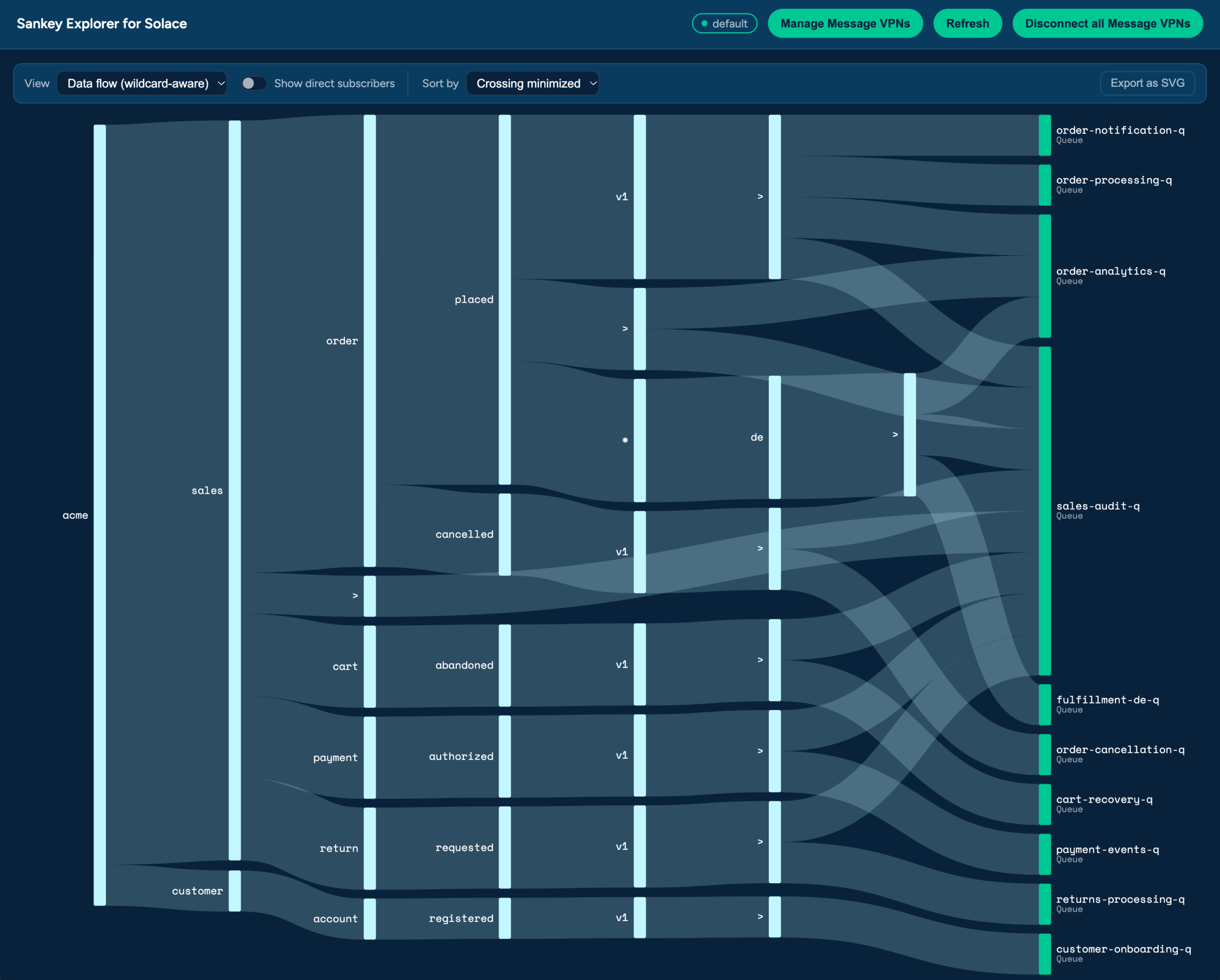
Sankey Explorer for Solace, which I built, draws topic subscriptions on the left, flowing into the queues, topic endpoints and direct subscribers that receive them. It reads the broker over SEMP v2, with no payload access, and it can hold several broker connections at once.
docker run -p 4000:4000 ghcr.io/solacelabs/sankey-explorer-for-solace:latest
What to look for. Start from an event and ask who is actually attached to it. The Sankey follows the topic hierarchy to every queue, topic endpoint and direct subscriber that receives it, including the ones that get it through a wildcard rather than an exact subscription. That makes it a tool for impact analysis before you change something. Two consumers receiving the same events is usually perfectly valid, so the question is not whether there is overlap but whether you know about it. Diagrams can be exported for architecture reviews.
One Limit to Keep in Mind
The Sankey draws configuration, not traffic. It shows what can reach a consumer, while the Sunburst shows what does flow. A subscription that never receives anything looks exactly like a busy one. In the screenshots, payment-events-q has a subscription to payment/authorized, yet the Sunburst shows no payment branch at all: nothing publishes there. Use the two views together.
Using Sunburst and Sankey to Roll Out a New Event Version
Here is how the two tools work together in a situation every event-driven team meets sooner or later.
Imagine the order team wants to publish a second version of the order event, acme/sales/order/placed/v2, because the payload needs new fields. The plan is to run v1 and v2 side by side for a while and retire v1 later.
This is what Solace Event Portal is built for. You create a new version of the event, say 2.0.0, whose topic address ends in v2, next to the existing one. The applications that produce and consume each version are modelled as well, so the portal shows which applications are meant to depend on v1.
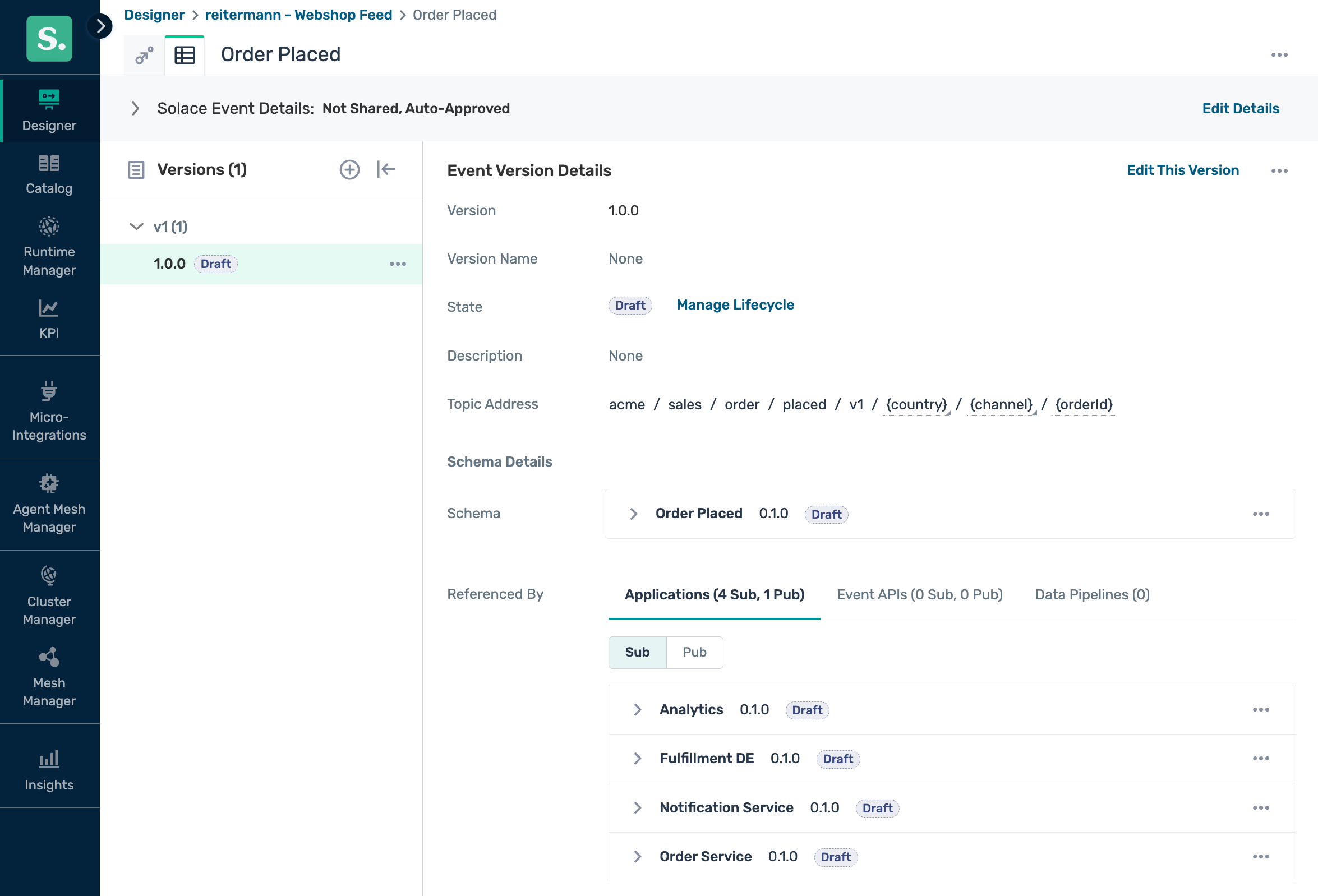
The event as designed: the topic address with its parameters, and the four applications that are meant to consume it (one producer, four subscribers).
Note that the topic carries its own version (v1), separate from the version 1.0.0 that the portal assigns to the event definition. By convention it follows the major version, but nothing ties the two together. Putting the version in the topic is a design decision: it lets v1 and v2 run side by side and lets consumers choose which one they want, at the price of exactly the migration problem described below.
That is the design. The runtime can differ from it: a consumer that was never modelled, a subscription that was widened a year ago, a queue nobody remembers. Before you mark v1 as deprecated, it is worth looking at what the broker actually does. A safe way to start: subscribe the Sunburst to a narrow branch such as acme/sales/> with a client whose ACL profile allows only that subscription, so you cannot pull more than you meant to.
Step 1: See What Exists
Connect the Sunburst to the sales domain and look at the placed branch. You see the v1 branch with its country and channel levels, and next to placed the other events of the domain, such as cancelled. Any sibling you did not expect is worth a question. That tells you which topics carry the event today, and how much traffic is on each.
Step 2: See Who is Attached
Open the Sankey against the same broker and follow order/placed. The subscriptions typically fall into four groups, and each one calls for a different conversation:
- Subscriptions pinned to the version, such as
acme/sales/order/placed/v1/>. These will silently miss everyv2event, so these consumers must migrate before you retirev1. - Subscriptions with a wildcard above the version level, such as
acme/sales/order/placed/>. These will start receivingv2the moment you publish it, next tov1. Depending on the consumer, that means duplicate processing or a payload it does not understand. - Subscriptions with a wildcard at the version level, such as
acme/sales/order/placed/*/de/>. Like the previous group, these will pick upv2, but only for part of the traffic, here Germany. These are the easiest ones to forget. - Broad wildcards such as
acme/sales/>. These receive everything, so find out whether that is intentional.
Then compare the result with the consumers modelled in Event Portal. Every queue that shows up in the Sankey but not in the model is a consumer nobody planned for. The next question is who owns it. That is easy to answer if you have thought about your queue taxonomy: a consistent naming scheme, and one place where you can look up who a queue belongs to.
Step 3: Migrate, Then Confirm
Publish v2 on a test broker first and look at both views again. Now the two views answer different questions. The Sankey tells you whether you may stop publishing v1: it shows which consumers still have a subscription that only matches v1, and it changes whenever a consumer moves to v2. The Sunburst tells you whether v1 is really gone: after the producer stops publishing it, read the rate of the v1 branch, which should fall to zero. The explorer remembers every level it has seen, so the branch itself does not disappear, and the rate is what counts. When the Sankey shows no consumer left on v1 and the rate has stayed at zero across your slowest business rhythm, retiring v1 is a decision based on evidence rather than on hope. For a clean check, reload the page and subscribe again: a v1 branch that does not reappear within your observation window is a branch nobody publishes to any more.
Event Portal can also run the comparison from step 2 for you. Its discovery scan collects queue and subscription configuration from the broker through an Event Management Agent and audits it against the designed model. Each runtime queue is matched against the modelled consumers and comes back as a match, a partial match, found only in runtime, or found only in design, and the runtime-only objects can be imported to complete the model. The two approaches complement each other. The explorers need no modelling and no agent, which makes them a quick way to look around, including on brokers where nothing is modelled yet. The portal is where you keep the design and the lifecycle, and where the result of that look ends up.
The point is the loop: look before the change, look after, and let the picture, not memory, tell you when the old thing can go.
Why It’s Important to Give Yourself a Complete View
Event Portal is where the intended picture lives, and these views show the actual one. The gap between the two is where the surprises are. None of the views raises an alert, and that is the point. They are for the afternoon where you sit down with a mesh you thought you knew and ask what it is actually doing. Most of what they show you will confirm what you already knew. The rest tends to be the thing that was always going to cause the next incident.
Once you know what to watch, the next step is to turn the findings into signals: event freshness, dead messages and processes that started and never finished. But that is a different article.
If you run one of the explorers against your own mesh and find something surprising, I would like to hear about it.
Explore other posts from category: For Developers


Subscribe to Our Blog
Get the latest trends, solutions, and insights into the event-driven future every week.