
Built for developers and operations teams, Studio simplifies the process of creating event-driven integrations while supporting the tools and workflows needed to take them into production This gives teams a new way to design and visualize real-time data integration pipelines with AI assistance.
It’s now available in Early Access and you can see it in action here:

At the heart of these pipelines are micro-integrations: small, purpose-built components that connect applications, databases and other systems to an event mesh, transforming and enriching data as it moves. An event mesh is a network of event brokers that distributes events across applications and environments. Together, these capabilities enable teams to build real-time data pipelines from independent, reusable components rather than complex, monolithic integrations.
EDA is Powerful…and a Lot to Ask
Event-driven architecture (EDA) asks people to think differently about integration. Instead of calling a service and waiting for a response, a system publishes an event describing what happened, and interested consumers react independently. That decoupling is powerful, but it takes practice, even for experienced developers.
Building a pipeline by hand adds another hurdle. Teams need to understand topics, subscriptions, event schemas and how messages move through brokers, then translate that understanding into configuration and code. Specialists can do it, but colleagues who know which data needs to move may still depend on a small group of EDA experts to make it happen.
The result is a growing integration backlog, not because the business requirements are unclear, but because the implementation expertise is concentrated in too few hands.
AI-assisted Design, with a Clear View of the Result
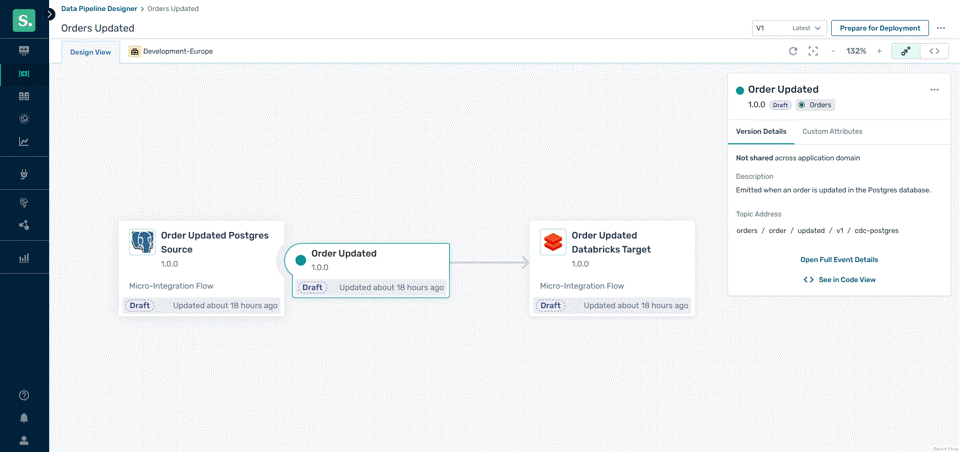
Studio brings pipeline definitions and visual understanding together. Start with a declarative configuration, using AI assistance to help describe the sources, targets and transformations you need. Studio displays the resulting pipeline on a visual canvas so teams can see how the pieces connect and what happens to data along the way.
The canvas is not a drag-and-drop replacement for the underlying architecture. It is a way to understand and work with a real pipeline defined in configuration. Developers can inspect and edit that definition directly, while other team members can use the visual representation to review the flow and collaborate more effectively. AI assistance helps reduce the effort of creating the definition without hiding how it works.
Built for Real Development and Operations
A visual representation alone is not the point. Studio models event-native integration: producers and consumers communicate through Solace brokers and the event mesh rather than relying on a tightly coupled sequence of synchronous calls. Components can evolve and scale independently, and a slow consumer need not hold up the publisher.
Because pipelines have declarative definitions, they fit established software development lifecycle practices. Teams can manage changes in version control, review definitions and incorporate them into GitHub-based workflows and CI/CD processes. Studio is intended for real staging and production use, not simply for drawing diagrams.
That also means Studio does not create a separate integration universe. A pipeline defined and visualized in Studio can reuse events published by applications or micro-integrations deployed earlier. Likewise, code-built applications and integrations can consume events produced by pipelines managed with Studio. The decoupled nature of EDA makes those building blocks interoperable without requiring each to know how the others were built.
From Pipeline Definition to Deployment
Defining and visualizing a pipeline is one part of the job; deploying it reliably is another. A pipeline may involve multiple micro-integrations, brokers, queues, topics and subscriptions. Configuring those pieces manually creates work and introduces opportunities for error.
Studio’s direction is to streamline that operational work as well as design, helping teams move from a pipeline definition toward consistent deployment and visibility into its health. The extent of automated provisioning, deployment health reporting and runtime monitoring available in the initial Early Access build is still being confirmed; these should not be mistaken for fully available capabilities today.
What’s Next for Studio?
The first focus for Studio is real-time data integration pipelines built with micro-integrations, but the event-native model behind its visual experience is broader than any one type of component. It aligns with the way Solace approaches event-driven systems in Event Portal, and creates a foundation for supporting more of what runs across the event mesh over time, including emerging agentic AI use cases.
That broader vision does not change the starting point: help teams define, understand and work with real integration pipelines more easily.
Get Early Access to Studio
Studio is here—and you can get Early Access now. Explore the product, put its pipeline design experience to work and help shape the capabilities that make it into Studio before broader availability and beyond.
Explore other posts from categories: Event-Driven Integration | Products & Technology




Subscribe to Our Blog
Get the latest trends, solutions, and insights into the event-driven future every week.