
The Challenges with Pure AI-orchestrated Flows in Production
The core issue is non-determinism. LLMs don’t execute a fixed function, they sample from a probability distribution. Temperature settings and prompt engineering can narrow the distribution, but they can’t eliminate it. For a conversational assistant, that’s acceptable. But it’s not for a process that must run the same steps in the same order every time.
There are additional failure modes that compound the problem:
- Observability gaps: When an orchestrator makes a wrong decision, e.g. assigning a task to the wrong agent, tracing why is difficult. The decision lived inside an LLM inference call. There is no explicit branch in code to point to, no line number, no deterministic condition that can be unit-tested.
- Brittleness under schema drift: If an upstream agent changes its output format slightly, a dynamic orchestrator may silently adapt by routing data to the wrong downstream agent without raising an error, because the LLM fills in the gap with a plausible but incorrect assumption.
- Compliance and audit requirements: Regulated industries require demonstrable proof that a process ran specific steps in a specific order. “The LLM decided the steps at runtime” is not an acceptable audit trail.
- Runaway costs: A poorly constrained orchestration loop where the LLM repeatedly re-delegates a task it cannot resolve will burn through tokens and time with no automatic circuit breaker.
None of this means the Orchestrator is the wrong approach. Outside the use cases it was designed for, prompt engineering cannot compensate for the absence of explicit control flow.
What Are Agent Mesh Workflows and How Do They Differ from the Orchestrator?
Solace Agent Mesh ships with two ways to coordinate agents: the Orchestrator and Workflows. They solve different problems.
- The Orchestrator is backed by a LLM and when it receives a task, it decides at runtime which agents to invoke, in what sequence, and how to assemble the result. It works well when the task is open-ended or the right path isn’t known in advance. The downside is that, and it isn’t guaranteed to be the same twice.
- A workflow is an explicit execution graph over your agents, code. You specify each step, the order they run, what data flows between them, and what happens when something goes wrong. The runtime follows your specification exactly: no inference, no interpretation.
Workflows move that control flow into configuration. The graph is explicit, version-controlled, and fully visible before the first message is sent.
The Orchestrator can invoke a workflow like any other agent in the mesh. Dynamic reasoning and deterministic execution aren’t mutually exclusive; they are to be used together to build the best suited solution.
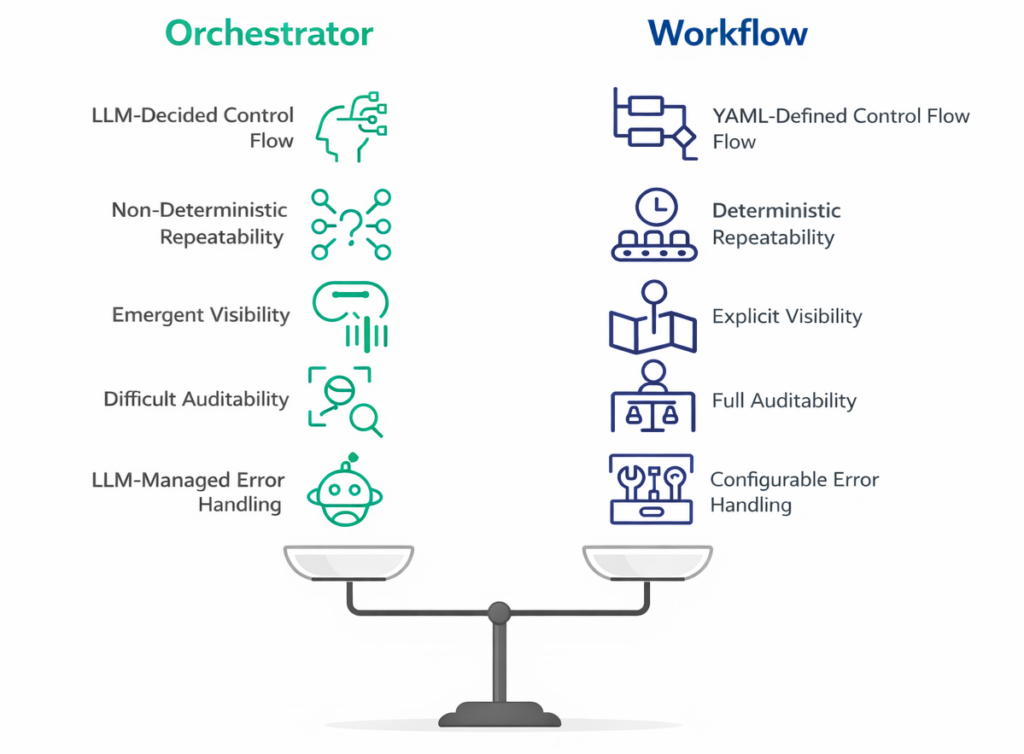
A workflow is also not a step down in intelligence. The individual nodes in a workflow are still AI agents. They still reason, interpret, and generate. What’s constrained is the control flow and not the capability of the agents executing within it.
Why Production Agentic Systems Need Explicit Workflows
LLMs Are Probabilistic by Design
This isn’t a criticism of LLMs. It’s a statement of how they work. A language model doesn’t execute a deterministic function, it samples from a probability distribution over possible next tokens. Every inference call is a weighted roll of the dice, shaped by the model weights, the prompt, the context window, and a degree of inherent randomness that no temperature setting fully eliminates.
For a chat assistant, this is fine. For a system making routing decisions about live business processes, it means you cannot guarantee the same execution path for the same input. At low volumes that’s manageable. At production scale, even a 1% deviation rate becomes hundreds of failures per day which are difficult to trace and prove.
The Error Threshold Problem
Traditional software systems are built with a near-zero tolerance for logic errors in critical paths. The expectation is that the code executes the same logic, in the same order, every time.
Pure orchestrator-led agentic solutions operate at a fundamentally different error threshold. Even well-engineered LLM orchestration will exhibit:
- Reasoning drift: The model reasons slightly differently across calls, producing different delegation decisions for semantically equivalent inputs.
- Prompt sensitivity: Minor changes in upstream agent output phrasing can shift how the orchestrator interprets the situation and what it decides to do next.
- Model version sensitivity: A model update from your LLM provider can silently shift the orchestrator’s behaviour across your entire production fleet overnight.
- Context window effects: As conversation history or tool call results accumulate in the context, the model’s attention shifts, affecting decisions made later in a long chain.
None of these are bugs you can fix. They are properties of the system.
The Cost of a Wrong Step
The cost of a wrong execution significantly depends on the context and use case. For low-stakes, read-only tasks like summarizing a document, drafting a response for human review, the orchestrator’s flexibility is worth the trade-off. If it takes a slightly different path, the worst outcome is a suboptimal answer that a human catches.
For tasks with side effects, the equation is different:
- A workflow that triggers a payment, modifies a database record, or fires an external API call cannot be “mostly correct.”
- A compliance process that must execute specific checks in a specific order cannot rely on an LLM to remember that order reliably.
- An incident response pipeline that escalates based on severity cannot afford to occasionally skip the severity classification step because the orchestrator inferred it was unnecessary.
These are not edge cases. They are the operational reality of running agentic systems at production scale, in domains where outcomes matter.
Explicit Workflows Are the Engineering Answer
Explicit workflows don’t reduce agent intelligence; they constrain the structure around it. Which agent runs, on what data, in what order, and with what fallback if it fails: all that lives in configuration you can read and test before it touches production. This is how reliable systems have always been built.
What Workflows are and Why They MatterThis video kicks off our series on Solace Agent Mesh workflows by covering the two approaches to agent coordination: the Orchestrator and Workflows.
The Workflow Execution Model: Node Types and Data Flow
A Solace Agent Mesh workflow is a list of nodes. Each node declares its dependencies via the property depends_on. Nodes with no unsatisfied dependencies run immediately in parallel if there are multiple.
Node Types
There are 5 node types in a workflow:
| Node | What does it do |
|---|---|
| Agent | Calls a named agent, passes input, captures output |
| Switch | Evaluates conditions top-to-bottom, routes to the first match |
| Map | Runs a node once per item in an array, parallel by default |
| Loop | Repeats a node until a condition is false |
| Workflow | Calls another workflow as a sub-step |
Passing Data Between Nodes
Data flows through template expressions using {{...}} syntax:
# From workflow input
input:
  order_id: "{{workflow.input.order_id}}"

# From a previous node's output
input:
  validated: "{{validate_order.output.result}}"
Two operators cover edge cases:
coalesce: Returns the first non-null value from a list. Useful when a node is conditionally skipped.concat: Joins values into a string.
A Note on Parallelism
Parallelism in your workflows can be achieved by declaring the dependencies between different nodes accurately. Two nodes with no depends_on relationship between them will run concurrently without any extra configuration. The workflow engine resolves the execution order from the dependency graph at runtime.
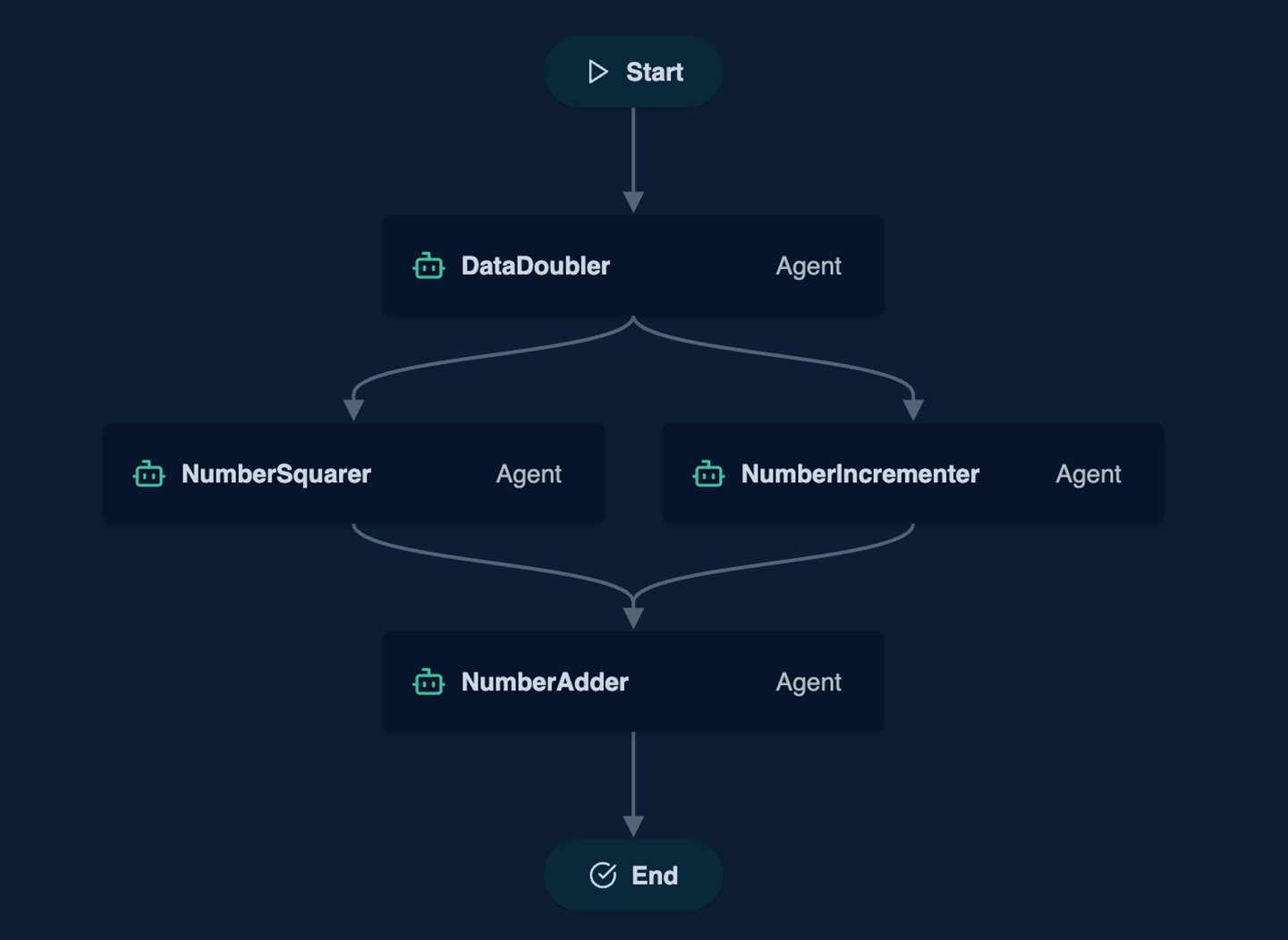
A simple example of a Directed-Acyclic-Graph (DAG) workflow is below which has 2 parallel agents feeding into a third.
Building Your First Workflow: Request for Quote
The Use Case
When a customer sends a request for quote (RFQ), a few things need to happen in the right order:
- Validate the request
- Check stock availability and lead times
- Calculate pricing based on volume and customer tier
- Route to auto approval or sales review based on total value or out of stock items
- Generate and deliver the quote.
None of these steps are optional, and the sequence matters. This is a very simple but critical scenario which cannot be left to the LLM’s planning. If the LLM occasionally skips the stock availability check or auto-approves a high value quote, it will lead to operational losses.
The Agents
The workflow is composed of the following agents:
| Agent | Responsibility |
|---|---|
| RFQValidator | Parses the incoming request, validates required fields, extracts line items |
| InventoryAgent | Checks stock availability and lead times for each line item |
| PricingAgent | Calculates price based on volume, margin rules, and customer tier |
| QuoteGeneratorAgent | Assembles and formats the final quote document |
| SalesEscalationAgent | Escalates to the sales team based on pre-defined conditions |
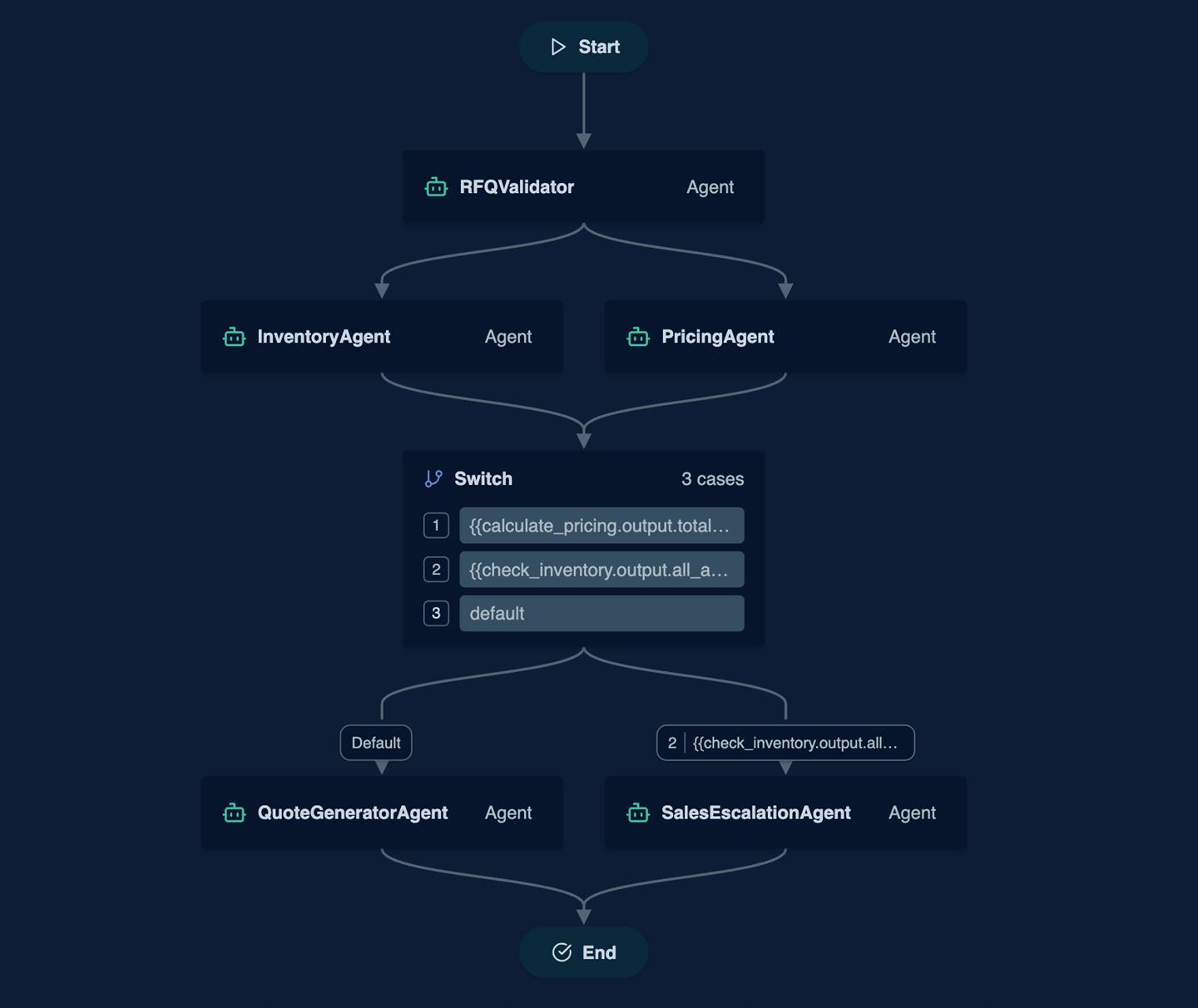
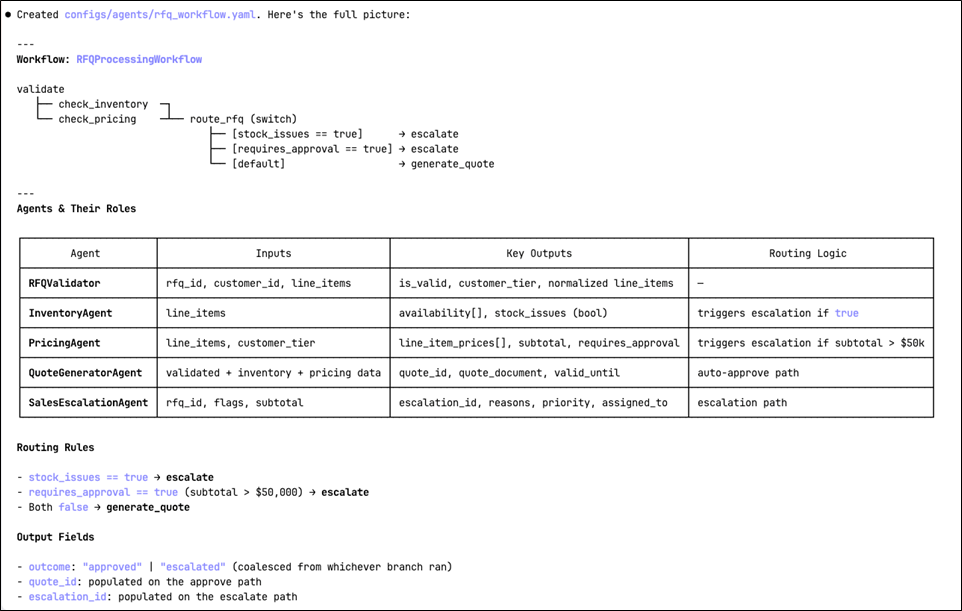
The validator runs first. Once that clears, inventory and pricing checks run in parallel as they don’t depend on each other but only on the validated RFQ. The quote generator waits for both before assembling the output. In case pre-defined conditions like high value orders or out of stock items, the SalesEscalationAgent flags the request to the sales team for manual handling.
What This Demonstrates
A few things worth pointing out in this configuration:
- Parallelism is implicit:
check_inventoryandcalculate_pricingboth declaredepends_on: [validate]but have no dependency on each other. The workflow engine runs them concurrently without any extra configuration. - The switch node enforces business rules: The routing decision to auto-approve or escalate for manual approval is encoded in conditions you can read and test, not inferred by an LLM at runtime. In this example, escalation is triggered if the total value is above €50k, or any line item out of stock.
coalescehandles the branching output: Since only one ofgenerate_quoteorescalate_to_saleswill run, the output mapping usescoalesceto pick whichever produced a result.

Triggering Workflows
When a Solace Agent Mesh workflow starts, it registers itself as an agent on the event mesh and publishes an agent card the same way any other agent does. From that point on, anything that can invoke an agent can invoke the workflow. No special integration, no separate endpoint to wire up.
Workflows are agents
The RFQProcessingWorkflow from the previous section becomes discoverable by name the moment it’s running. It can be triggered directly from the WebUI chat gateway along with the Orchestrator and REST gateway. Another workflow can invoke it as a sub-step using a workflow node. The entry point is always the same: send a message to the workflow’s address on the broker with a payload matching its input_schema.
Event-Driven Invocation
Because Solace Agent Mesh distributes data in an event-driven manner via Solace Event Broker, workflow invocations are events. An upstream system can publish an event to the broker, and the workflow picks it up.
For the RFQ use case, this means a sales portal can publish a rfq-received event the moment a customer submits a request, and the workflow processes it without the portal knowing anything about Solace Agent Mesh’s internal structure.
Invoking from the Orchestrator
The Orchestrator discovers workflows through their agent cards, including the skills you define. If a user says “process this RFQ”, the Orchestrator can identify RFQProcessingWorkflow as the right tool and invoke it directly by passing the structured input it needs.
This is where the two components fit together. The Orchestrator handles the ambiguous front-end interactions like understanding intent, gathering missing fields, and confirming with the user. Once it has everything it needs, it hands off to the workflow, which executes the rest deterministically.
Vibe Coding a workflow
Writing a workflow from scratch is not quite complex, but getting the final version might take a few iterations. Solace Agent Mesh’s vibe coding support shortens this iterative process considerably.
Agent Mesh provides native support for vibe coding by connecting your coding assistant to the Agent Mesh codebase and documentation via a Context7 MCP integration.
Setting Up
- Follow the MCP installation instructions for your IDE to connect your coding assistant to Context7 using the MCP server.
- Verify the integration by asking the coding assistant:
Use the solacelabs/solace-agent-mesh context7 library when answering questions in this chat session.

Using Vibe Coding
- Following our previous example, use the below prompt in your coding assistant:
I want to create a new workflow based on a Request-For-Quote use case. The workflow should have the following agents: - RFQValidator : Parses and validates the incoming RFQ. Extracts line items, checks required fields, and determines the customer tier. - InventoryAgent : Checks stock availability and lead times for each line item. Runs in parallel with PricingAgent after validation. - PricingAgent : Calculates quote price based on line items, volume, and customer tier. Runs in parallel with InventoryAgent after validation. - QuoteGeneratorAgent : Assembles the final quote document when auto-approval conditions are met. - SalesEscalationAgent : Handles RFQs that exceed the auto-approval threshold or have stock issues. The workflow : RFQProcessingWorkflow should orchestrate the full RFQ pipeline : validate → (inventory ∥ pricing) → route → generate_quote | escalate - The coding assistant generates the below draft for your review:

- You can review and iterate through the configuration to make sure that it meets your expectations.
What to Watch For
While vibe coding handles structure well, it handles details less reliably. A few things to double check before running generated workflows:
- Schema fields and structure
- Switch conditions
- Dependencies
- Error handling
Start with the core flow, test it, then add-in error handling and retry once the happy path works. While vibe coding is most useful to get the structure right quickly, the nuances and fine tuning are still the critical parts for you to focus on.
Vibe Coding a WorkflowIn this video, we the full RFQ workflow in Solace Agent Mesh using Context7 MCP server as the vibe coding tool of choice. We walk through the complete YAML configuration: five agents and a workflow definition in a single file.
Conclusion and Key Takeaways
- The Orchestrator and Workflows solve different problems. The Orchestrator is the right tool for open-ended, exploratory tasks where the path isn’t known upfront. Workflows are for processes where the steps, sequence, and decision rules are known and too critical to leave to runtime inference.
- LLM non-determinism is not a bug you can fix. Reasoning drift, prompt sensitivity, and model version changes; these are basic properties of how LLMs work. At production scale, even a small deviation rate compounds into operational failures.
- Explicit control flow belongs in configuration, not in an inference call. Solace Agent Mesh workflows define every step, branch, and dependency in YAML. The result is a process you can read, test, version-control, and audit before it is deployed to production.
- Five node types cover common patterns. Agent invokes a specialist, switches for conditional routing, map for parallel collection processing, loop for polling, and workflow for composing larger pipelines from smaller ones.
- Implicit Parallelism. Two nodes with no dependency between them run concurrently without any extra configuration. The execution order is resolved from the dependency graph at runtime.
- Workflows register as agents. Once running, a workflow is discoverable and invokable by name, by the Orchestrator, by a REST gateway, by another workflow, or by any upstream system publishing an event to the Solace broker. No special wiring is required.
- Error handling is first-class. Per-node retry strategies with exponential backoff, exit handlers for cleanup and alerting, configurable fail-fast behaviour, and hard timeout limits are all built into the configuration model.
Next Steps and Resources
- Documentations: Workflow Documentation
- Vibe coding: Vibe coding in Solace Agent Mesh
- Have a question? Ask in Community
- Star the Solace Agent Mesh Github Repository
- Try out the open-source Solace Agent Mesh: Open-source Solace Agent Mesh
- Contact us to schedule a demo: Schedule a Solace Agent Mesh Demo
- Ask to run a Solace Agent Mesh pilot: Run a pilot
Explore other posts from categories: Artificial Intelligence | For Architects | Solace Agent Mesh




Subscribe to Our Blog
Get the latest trends, solutions, and insights into the event-driven future every week.
