DMR Export Filters deliver more control over where real-time data moves
Decide exactly which subscriptions your event mesh shares between clusters, with no application code and no restart.
An event mesh is most valuable when events flow freely to wherever they are needed. As a mesh grows across regions, business units and environments, “freely” needs guardrails. Who is allowed to attract which events into which cluster? DMR export filters give platform and security teams a clear, central answer to that question.
- Stronger governance. Set one policy per Message VPN that controls which subscriptions a cluster advertises to other clusters. The rule is enforced on the gateway node no matter which application adds a subscription.
- Data residency and compliance. DMR only sends events where a subscription has been advertised. By blocking specific subscriptions from being exported, you stop regulated topic spaces from being pulled into regions where they should not land.
- Environment isolation. Keep subscriptions from a development or test cluster from leaking back into production, and the reverse.
- Lower risk of accidental exposure. A broad wildcard subscription added by one team can no longer attract a flood of traffic across the WAN. The right filter can catch it at the boundary.
- Protected bandwidth and cost. Heavy traffic attracted by broad local subscriptions stays off your wide area network links.
- Zero downtime. Filter changes take effect without a restart or reload, so you can tighten policy while the mesh is running.

A quick refresher: what is DMR?
Dynamic Message Routing (DMR) links event brokers into a self-routing mesh. Brokers are grouped into clusters, and every node in a cluster connects to every other node over internal links. Gateway nodes connect clusters to each other over external links.
The mesh learns what to route from subscriptions. When a client adds a subscription, the broker advertises it to its neighbors. Before a gateway node sends subscription information to another cluster, it aggregates the full subscription set for its cluster. As subscriptions come and go, the network-wide picture updates automatically. Events then travel only to the clusters that have asked for them. Nobody has to maintain static routes or write bridging code.
That convenience has a side effect. By default, a Message VPN with export enabled advertises every local subscription to other clusters. Export filters are the new control over that behavior.
How export filters work
An export filter is a per-Message VPN setting that restricts which local subscriptions are advertised to other clusters over a gateway node’s external links. Each filter is a list of entries written as standard topics, and entries can use the single-level wildcard (*) and the multi-level wildcard (>). There are two kinds of entry:
- Allow entry: a subscription pattern that is allowed to be exported, for example orders/>.
- Exclude entry: a subscription pattern that is blocked from export, marked with a leading !, for example !orders/uk/>.
What you configure determines how the Message VPN behaves:
| Mode | You have configured | Result |
| Export-all | No entries | Every subscription is exported, as it is today. |
| Export-all with exclusions | Exclude entries only | Everything is exported except subscriptions that match an exclude entry. |
| Allow-list | One or more allow entries (exclude entries optional) | Only subscriptions that match an allow entry are exported. An exclude entry always wins. |
The rules the broker applies
- Allow entries must be as broad as the subscription. An allow entry of orders/> matches a subscription of orders/uk/confirmed, but orders/uk/> does not match a broader subscription of orders/>.
- Exclude entries block on any overlap. If an exclude entry and a subscription overlap at all, the subscription is not exported, even if neither is broader than the other.
- Exclude beats allow. If a subscription matches both, it is not exported.
- #noexport still wins. Subscriptions that clients mark with #noexport are never exported, and export filters work independently of that setting.
Here is how that plays out:
| Filter entry | Subscription | Exported? |
| orders/> | orders/uk/confirmed | Yes. The allow entry is broader than the subscription. |
| orders/uk/> | orders/> | No. The subscription is broader than the allow entry. |
| !orders/uk/> | orders/> | No. The topics overlap, so the exclude entry blocks export. |
Scope
Export filters apply only to external links between gateway nodes in different clusters. They do not affect subscription propagation inside a cluster, which you continue to control with subscription ACLs and #noexport. One filter set applies to all of a Message VPN’s external links, and you cannot set a separate filter for an individual DMR bridge.
Configure it in Broker Manager or the CLI
You can manage export filters from the DMR tab in Broker Manager, or from the CLI under the Message VPN’s dynamic-message-routing configuration. Changes apply immediately.
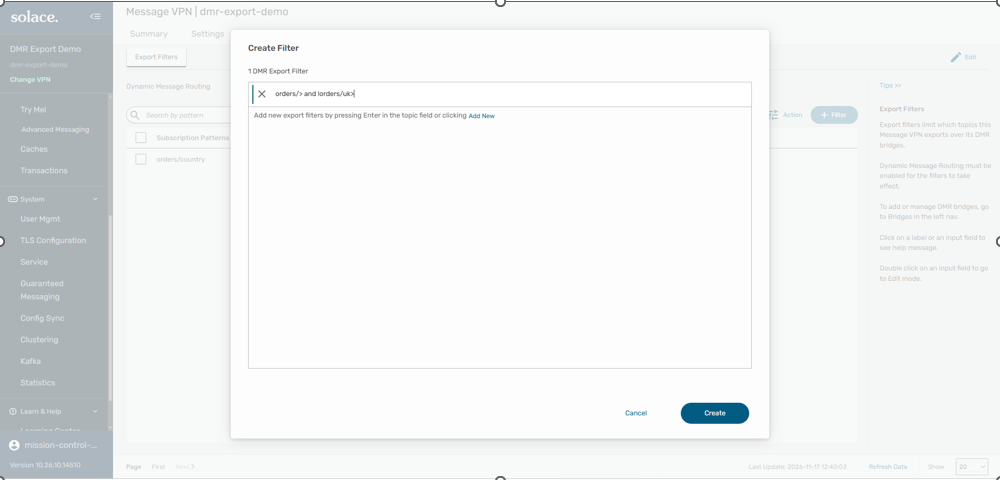
Solace Event Broker: Broker Manager GUI showing how to create a DMR export filter
To create a filter in Broker Manager:
- Open Broker Manager and select the DMR tab. It opens on the Export Filters page.
- Click + Filter.
- In the Create Filter dialog, enter a subscription pattern. Enter orders/> for an allow entry, or !orders/uk/> for an exclude entry. Press Enter to add more patterns.
- Click Create.
Creating filters needs the Mission Control Manager role in Solace Cloud, or read/write access to the Message VPN on software and appliance brokers and these functions are also available via CLI.
Examples
Example 1: Keep a topic space out of a region
A European cluster must not attract UK order events. Add one exclude entry and leave everything else alone.
| Filter entries | What happens |
| !orders/uk/> | All other subscriptions are exported as usual. Any subscription that overlaps orders/uk/> stays local, so UK order events are not attracted to this cluster. |
Example 2: Give high-value traffic its own dedicated link
Add an exclude entry to stop a topic space from flowing over the DMR external link, then create a Message VPN bridge that subscribes to that same topic space. That traffic travels only over the bridge, and everything else keeps using DMR’s interest-based routing.
| Piece | What it does |
| !orders/uk/> (exclude entry) | Stops that topic space from being advertised over the DMR external link. |
| Message VPN bridge subscribing to orders/uk/> | Carries that topic space on its own dedicated link. |
| Everything else | Keeps using DMR’s interest-based routing. |
Example 3: Allow a topic space, with one exception
Combine the two entry types to share a topic space while carving out a sensitive branch.
| Filter entries | Subscription | Exported? |
| orders/> and !orders/uk/> | orders/de/confirmed | Yes. It matches the allow entry and does not overlap the exclude entry. |
| orders/> and !orders/uk/> | orders/*/confirmed | No. It overlaps orders/uk/confirmed, so the exclude entry blocks it. |