Request, Approve, Promote: Deployment Approvals Arrive in Solace Event Portal
This feature released earlier this year, but is a key part of broker, event and application environments, versioning and access that highlights the use of key governance controls across the platform. Since it slightly pre-dated the creation of this what’s new page we thought it worth bringing into the page timeline to highlight the new capability.
Governed Self-Service for Shared Runtime Environments
Event brokers in Staging, UAT, and Production environments are shared infrastructure. Dozens or hundreds of application teams often deploy to the same event mesh, and until now, that meant one of two things: give every developer broad runtime access and hope for the best or require they request every broker configuration change be made on their behalf by whoever happened to hold the right level of access to the target environment. Neither option scales cleanly once your event-driven architecture moves from a handful of teams to an organization-wide rollout.
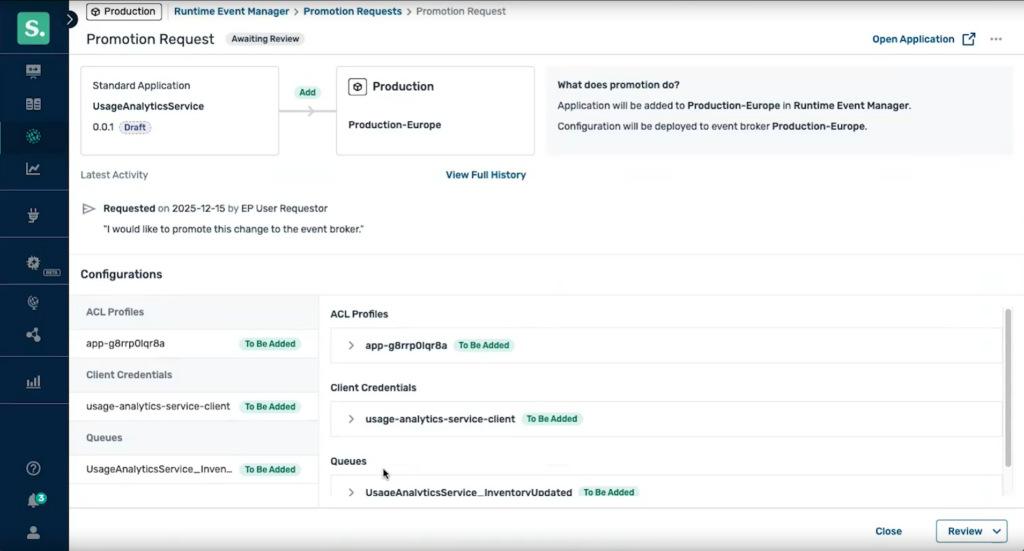
Event Portal now includes a built-in request and approval workflow for deploying or promoting application version broker configuration changes to an environment. A developer with Application Domain Editor access, but without EP Runtime Editor access to a target environment, can request approval to deploy or promote their application version, right from Designer or via the Event Portal REST API. It’s the same request/approval model already trusted for event data access requests, extended to cover broker configuration changes for applications to be promoted, so there’s nothing new to learn.
Key Capabilities & Business Value
- Request Without the Side Channel: Developers request deployment/promotion approval directly in Event Portal or via the API, replacing ad hoc Slack messages and email chains with a workflow anyone can find and track.
- Notified Approvers, Clear Decisions: Approvers are notified by email and in-app the moment a request comes in, and can approve, deny with a comment, or revoke a previous approval, all without leaving Event Portal.
- Governance Built In, Not Bolted On: Every request and decision is captured in the platform audit trail. Because only one application version can be associated with a broker at a time, an approved promotion automatically and cleanly replaces whatever was there before.
- API-First for CI/CD: The full request, approval, and promotion flow is available through the Event Portal REST API, so it can be wired into existing CI/CD pipelines and extended in the future to third-party workflow systems like ServiceNow.
How It Works
For Solace modeled event meshes, the workflow follows the same shape as Event Portal’s existing event access approvals (Kafka applications and event versions not yet supported). A developer without edit access to an application domain creates a deployment request for their application version, optionally adding a comment to explain the need for the change. That request routes to whoever is designated approval rights for that environment, who reviews it alongside the application details already in Designer. Once approved, the developer promotes the application version configuration changes themselves, at whatever time makes sense, and the previous version’s configuration on that broker is automatically updated. If a request is denied, the developer is notified with the reviewer’s comments and can update the application before resubmitting.