
AI agents are costing more than companies planned. In an IDC survey published in August 2026, 67% of enterprises said their spending on agents had run more than 10% over budget in the past 12 months. IDC’s advice was to engineer cost controls such as prompt caching and model routing into the platform, not just write them into a policy. This post covers how Solace Agent Mesh does the first and why decision nodes help with the second.
Look closely at the bill for almost any long-running AI agent and you will find the same pattern. Most of the input tokens are text the model has already read.
An agent works through a task in a loop. The model asks for a tool, the platform runs it, and the conversation, now including the result, goes back to the model. The loop repeats until the task is done. Because each call carries the whole conversation, a result that stays in the conversation is carried on every call that follows.
How Context Size Drives the Cost of Running an AI Agent
The context window is everything the model reads on one call: the instructions, the tool definitions, the conversation so far, and every tool result. You pay for all of it on every call. A query that returns 184 KB of rows adds about 46,000 input tokens to the next call, and to the call after that, and to every call until the task ends.
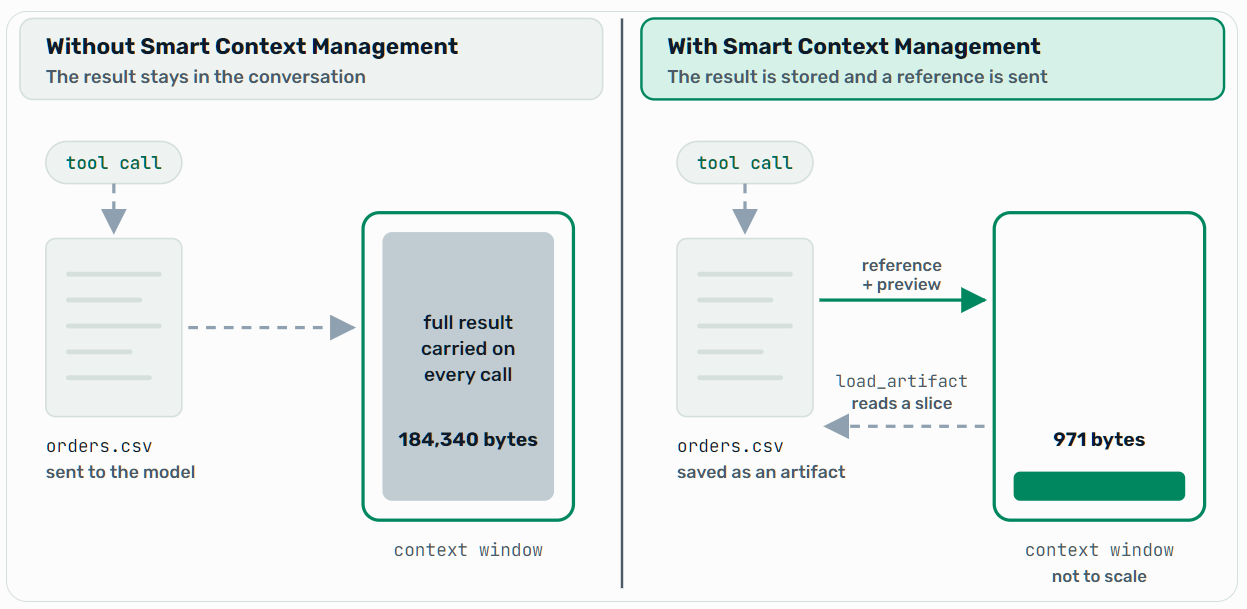
The same 184,340-byte result with and without Smart Context Management. The reference block is not drawn to scale.
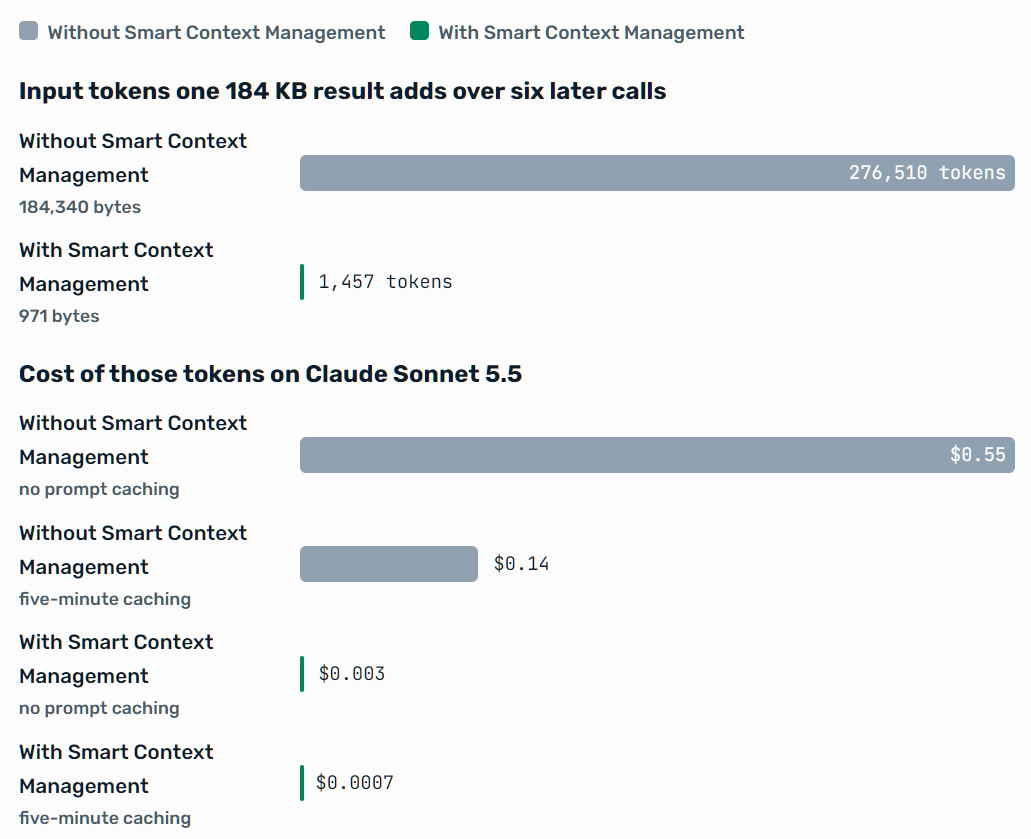
Tokens are estimated at 4 bytes per token, the approximation Agent Mesh uses when it compacts conversation history. The cost bars price those tokens at Claude Sonnet 5.5’s list prices. With no prompt caching, every call pays $2 per million input tokens. With five-minute caching, the first call pays $2.50 per million to write the content to the cache, and the next five pay $0.10 per million to read it. Caching lowers the cost of both, and the reference stays about 190 times cheaper either way. The 971 bytes is measured, as described below.
Context engineering is the work of deciding what goes into that window. Solace Agent Mesh does much of it for you.
Smart Context Management in Solace Agent Mesh
Smart Context Management is a set of techniques that fall into five groups:
- Keep large content out — The files that tools return, uploaded files, and query output are stored as artifacts, and the model receives a short reference.
- Make what stays cheaper — Prompt caching marks the stable parts of each request so that providers can reuse them at a reduced price.
- Shrink what grows — History compaction summarizes the oldest part of a long conversation.
- Start small — Skills load on demand, the tool list is filtered, and peer agents work in their own context.
- Skip the model — Late embeds, templates, and workflow steps do work that the model would otherwise type or decide.
These techniques run inside Agent Mesh, not at the model provider. Artifact routing, data tools, compaction, templates, and workflows behave the same whichever model provider your agents use and wherever you run Agent Mesh, on your own machine, in your Kubernetes cluster, or in the cloud. You can change providers, or give different agents different models, without losing them. Only prompt caching depends on what the provider supports.
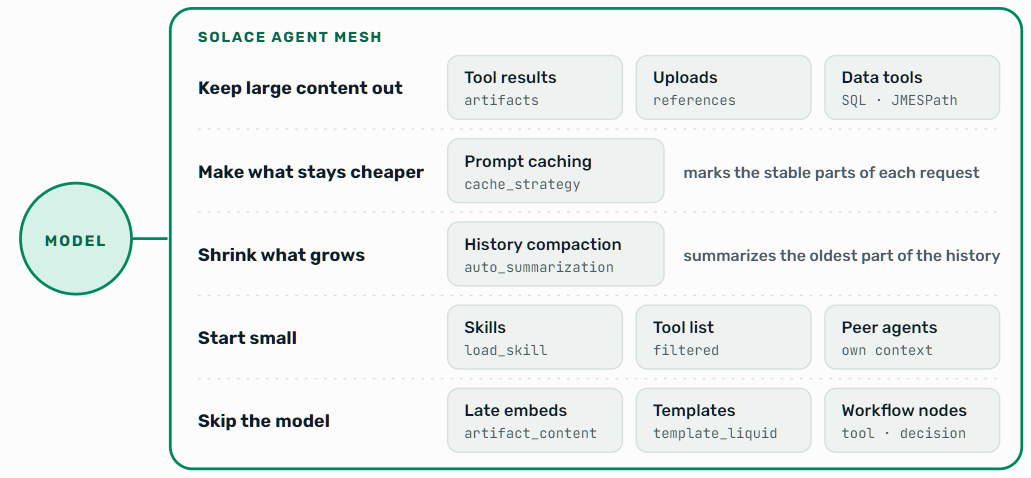
The five groups of techniques, with the tool or setting behind each.
Most of it works without configuration. We walk through each group and share what we measured.
Keeping Large Tool Results Out of the Context
Agent Mesh checks the files and content a tool attaches to its result before they reach the model. A tool that returns only a small structured answer, such as a count or a status, sends that answer to the model as it is. For attached files and content, the rule depends on the type and size:
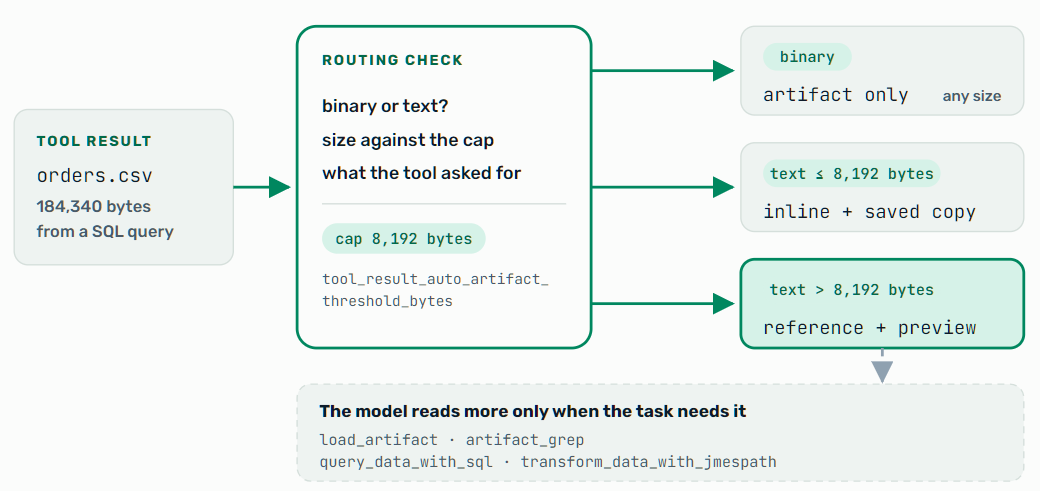
The default routing for text and binary content attached to a tool result. A tool can ask for different handling, and tools that run in the Secure Tool Runtime or over MCP have their own rules.
Tool Results Become Artifacts
Binary output, such as an image, a PDF, or an archive, is always saved as an artifact, whatever its size. Text up to the cap stays in the conversation and is also saved. Text over the cap is saved, and the model receives a reference and, by default, a preview of the first 500 bytes. The reference for the large result in the diagram looks like this, with the preview shortened:
{
  "artifacts_created": [{
    "filename": "orders.csv",
    "version": 0,
    "size_bytes": 184340,
    "mime_type": "text/csv",
    "description": "Orders from the sales database",
    "preview": "order_id,customer,region,status,amount,created_at\n100000,customer-0000,...",
    "schema": {
      "columns": ["order_id", "customer", "region", "status", "amount", "created_at"],
      "type": "text/csv"
    }
  }],
  "message": "query returned rows",
  "status": "success"
}
The model sees the file name, size, type, description, the start of the content, and for data files the inferred column names. That is enough to decide what to do next.
When the task needs more, the model calls load_artifact to read the whole file or a slice of it, or artifact_grep to search inside it. The platform decides what the conversation carries, and the model decides what to pull back, a pattern context engineers call offloading. Tools that run in the Secure Tool Runtime save the files they write as artifacts at any size, without the inline copy that a small result normally gets. Tools reached over the Model Context Protocol (MCP) have their own thresholds. Agent Mesh saves an MCP result above 2,048 bytes while still returning it inline. Above 4,096 bytes, it replaces the result with a reference and, for JSON or YAML, a short structural summary. For more information about how artifacts are stored and versioned, see the Artifacts documentation.
Uploaded Files Arrive as References
When a user attaches a file in the Agent Mesh UI, or through an entrypoint such as Slack, Microsoft Teams, or WhatsApp, the file is saved as an artifact before the model sees it. A text file of 2,048 bytes or less is included in the context. A larger text file, or any other kind of file, becomes a short summary with its description, type, size, and, for tables, its column names. The model loads the content with the artifact tools when the task needs it, so a large spreadsheet in a chat does not become input on every call.
Data Tools Compute Where the Data Is
For a question about a large data set, the model needs the answer, not the data. The query_data_with_sql tool runs a read-only SQL query against a CSV, JSON, YAML, or SQLite artifact, and transform_data_with_jmespath applies a JMESPath expression to a JSON, YAML, or CSV artifact. Each saves the full result as a new artifact and returns a preview of up to 50 rows and 2,048 bytes, plus the name of the file that holds everything.
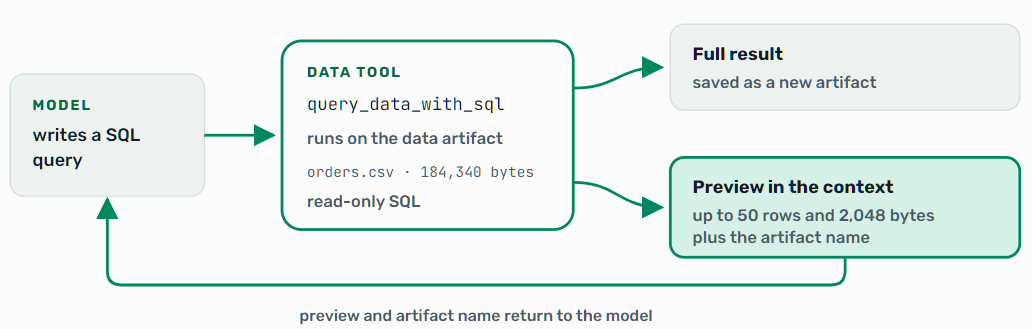
The model asks a question and reads a preview. The full result stays in an artifact.
What It Saves
We measured the routing itself. We ran Agent Mesh’s own handling of attached tool results on a CSV of order rows at four sizes, with default settings, and counted the bytes of the message the model receives:
- 41 KB result (40,974 bytes) — The model receives 970 bytes, a reference and preview, or about 243 tokens.
- 184 KB result (184,340 bytes) — The model receives 971 bytes, or about 243 tokens.
- 1 MB result (1,048,634 bytes) — The model receives 972 bytes, or about 243 tokens.
Past the cap, the size of the result stops mattering to the conversation. A 1 MB result is about 262,000 tokens, more than a 200,000-token context window can hold on its own, and it reaches the model as about 1 KB. Below the cap, the model gets the full content, because a small result is cheaper to read than to fetch. The fourth size, a 4.1 KB result (4,142 bytes), is under the 8 KiB cap, so it stays in the conversation. The model receives 5,187 bytes, about 1,297 tokens on each later call: the full content plus a short record of the copy that Agent Mesh also saves. That is slightly more than the result itself, and it means the model never has to make a tool call to read a small result.
The model still sees what is there.
It just stops carrying it.
The saving is an estimate because it compares against a run that never happened. It assumes the agent would have made the same calls if the full content had stayed in the conversation. With the full content in front of it, a model can take a different path, sometimes with fewer calls and sometimes with more, so read the figure as a measure of what Agent Mesh kept out, not an exact cut to the bill.
The saving also lasts only while the content stays out. A model that loads the whole artifact back into the conversation pays for most of it again on every later call. That is why it matters that the model reads a slice, searches with artifact_grep, or queries with the data tools instead. The next sections cover techniques that cut the cost even when the content does come back.
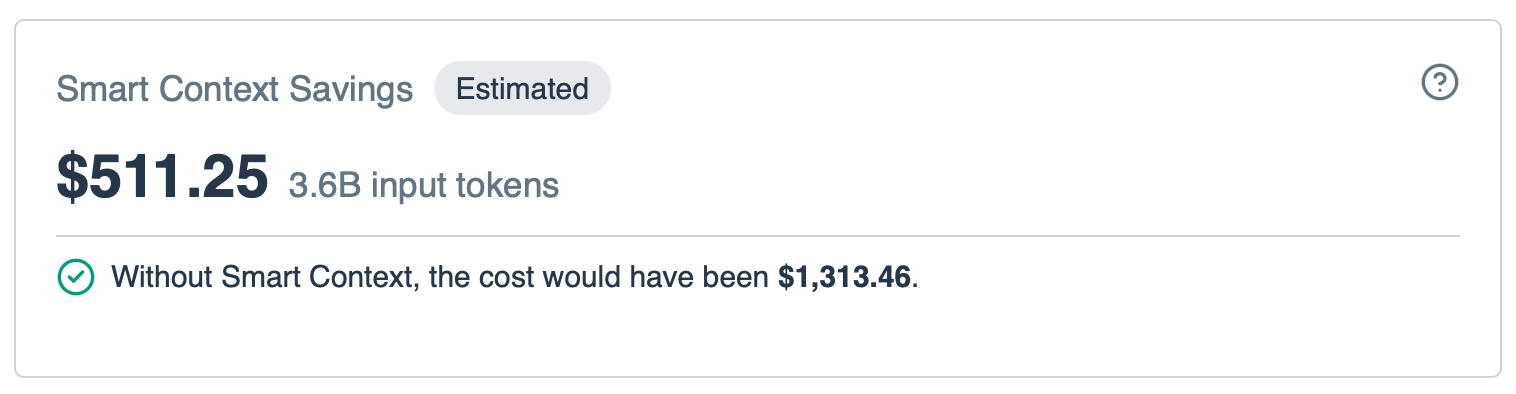
The Smart Context Savings card on the Cost and Token Usage page. It estimates that Smart Context Management kept 3.6 billion input tokens out of the model and saved $511.25, so the same work cost about 39% less than the $1313.46 it would have cost otherwise.
Other Ways to Keep the Context Small
Prompt Caching
Agent Mesh marks the stable parts of every model request so that providers that support prompt caching can reuse them at a reduced price. The marks cover the system prompt, the tool definitions, and the most recent messages. The marks on recent messages move forward on every call, so a growing conversation stays cached.
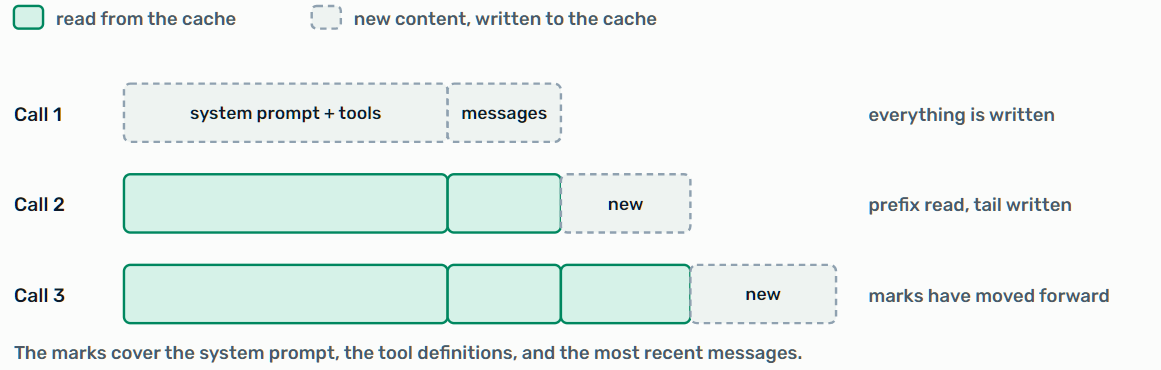
The cache marks cover a stable prefix. Each later call reads it and writes only the new tail. Segment sizes are illustrative.
You choose the strategy on the model configuration, under Prompt Caching Strategy in the model form’s advanced settings, or with cache_strategy in YAML. For the model form, see Configuring Models. The default, 5m, keeps cached content available for five minutes between calls. The 1h strategy keeps it for an hour, which suits tasks with long pauses, and none adds no marks.
The effect is large when the same prefix repeats. In a 20-call task with a 30,000-token stable prefix on Claude Sonnet 5.5, caching cuts the prefix cost from $1.20 to about $0.13. Sonnet 5.5 charges $2 per million input tokens, $2.50 for a five-minute cache write, and $0.10 for a cache read.
That saving is an upper bound, because a real conversation grows with every call. Agent Mesh attaches the marks to every request, but providers differ in what they do with them. Anthropic honors them. For a Claude model behind an OpenAI-compatible gateway such as LiteLLM, Agent Mesh keeps the marks when the model name identifies Claude, so an alias with no Claude name in it loses them.
History Compaction
When a model reports that its context limit was exceeded, Agent Mesh summarizes the oldest part of the conversation with one extra model call, replaces that part with the summary, and retries. By default it summarizes about the oldest 25% of the conversation, limits the summary to 5,000 tokens, and runs up to three times for one task. Compaction is on by default. Users can also compact on demand from the context-usage indicator in the Agent Mesh UI, which appears when a conversation uses about half of the model’s maximum input size. On-demand compaction uses the same 25% setting. For more information about how conversation history is stored and compacted, see the Sessions documentation.
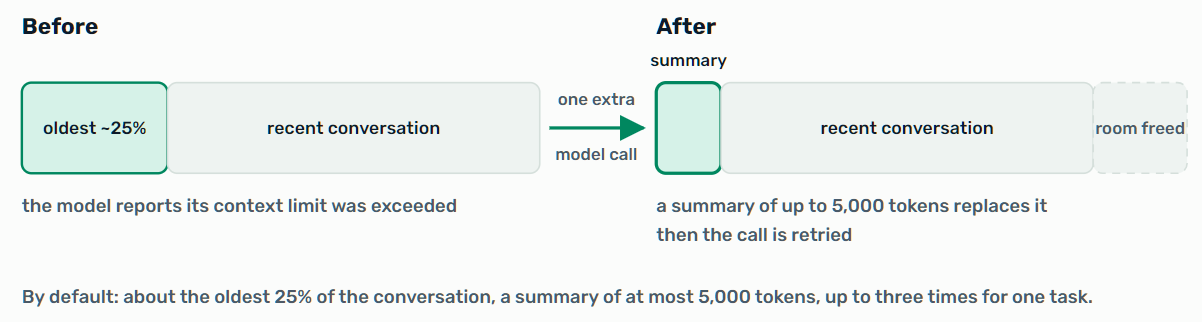
History compaction replaces the oldest part of the conversation with a summary. Segment sizes are illustrative.
Skills, Tool Lists, and Peer Agents
Three more techniques keep the starting context small instead of trimming it later:
- Skills load on demand — The model sees each skill’s name and description. The full instructions load when it calls
load_skilland stay until it callsunload_skill. Context engineers call this pattern progressive disclosure. To author a skill, see Creating Skills. - The tool list is filtered — Tools the model cannot use yet, such as those owned by a skill that has not loaded, are left out of the request. With role-based access control configured, so are tools and peer agents the user is not authorized to call.
- Peer agents work in their own context — The agent that delegated a task receives the peer’s final response, the names, versions, and status of the artifacts it produced, and the peer’s task status and metadata, such as its agent name and token usage. It reads an artifact’s content only if it calls
load_artifact. The noisy reading happens elsewhere, and the delegating agent sees the conclusion. Context engineers call this pattern isolation.
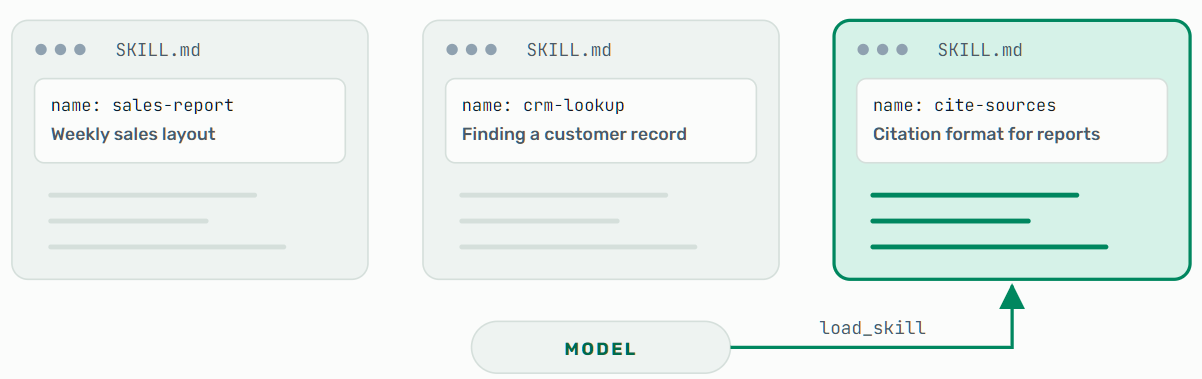
A skill’s name and description are always in the request. Its instructions load when the model calls load_skill. The skill names are examples.
Optimizing Output Tokens
Everything so far makes each model call read less. What the model writes matters even more. Output tokens cost several times more than input tokens: on Claude Sonnet 5.5, $10 per million against $2, five times as much. The model also generates them one at a time, so they set how long a reply takes. That is why Agent Mesh puts special effort into cutting the tokens a model has to write. Two techniques hand the writing to Agent Mesh instead.
Late Embeds Deliver Data Without Carrying It
When a user needs the contents of a large artifact, the model does not have to read it and repeat it. It writes a one-line directive such as «artifact_content:report.md» in its reply, and the entrypoint, the component of Agent Mesh that delivers replies to users, replaces the directive with the artifact’s content on the way to the user. The content does not pass through the model. By default the entrypoint does this for artifacts up to 10 MB, set with gateway_artifact_content_limit_bytes, and replaces anything larger with a short truncation notice. When the user needs only part of an artifact, a chain of modifiers selects just that part on the same path, after the model and before the user:
«artifact_content:sales.csv >>> select_cols:month,revenue >>> slice_rows:0:20»
The user receives 20 rows of two columns from a large CSV, and the model wrote one line. Other modifiers include jsonpath, filter_rows_eq, grep, head, and tail. When the model itself needs a slice, it uses artifact_grepor the data tools instead.
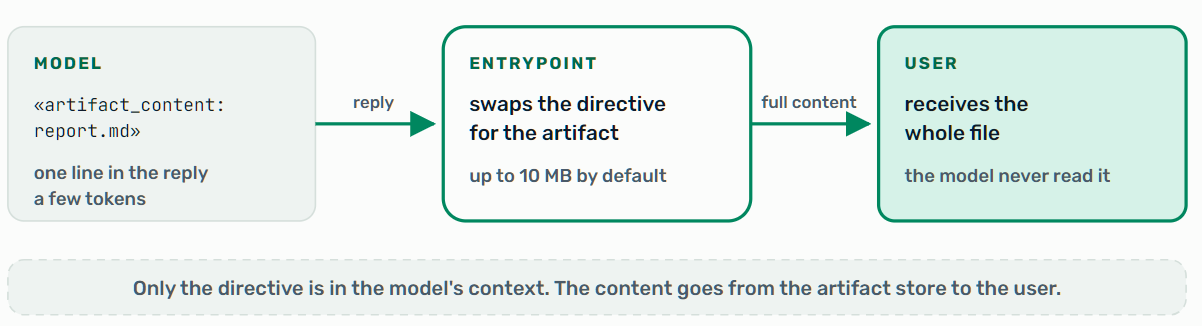
A late embed: the model writes a directive, and the entrypoint delivers the content to the user.
Templates Save Output Tokens
When an agent produces a table or a report, typing it token by token is the slowest and most expensive way to do it. With templates, the model writes only the data, a small JSON or CSV artifact, and a template renders the document when it is served. A short block like this replaces the rows the model would otherwise write out:
«««template_liquid: data="sales.json"
{% for row in items %}- {{ row.month }}: {{ row.revenue }}
{% endfor %}»»»
The model writes the block. Agent Mesh reads the rows from sales.json, exposes the JSON array as items, and renders one line per row.
For reports you produce again and again, packaged templates are coming soon. A packaged template file bundles the document and a contract for its data. The model then passes only the data and a few values, and Agent Mesh validates the data against the contract and renders the report. We measured both cases, the second on a pre-release build. First, a table of a given size, typed by the model or rendered by a template:
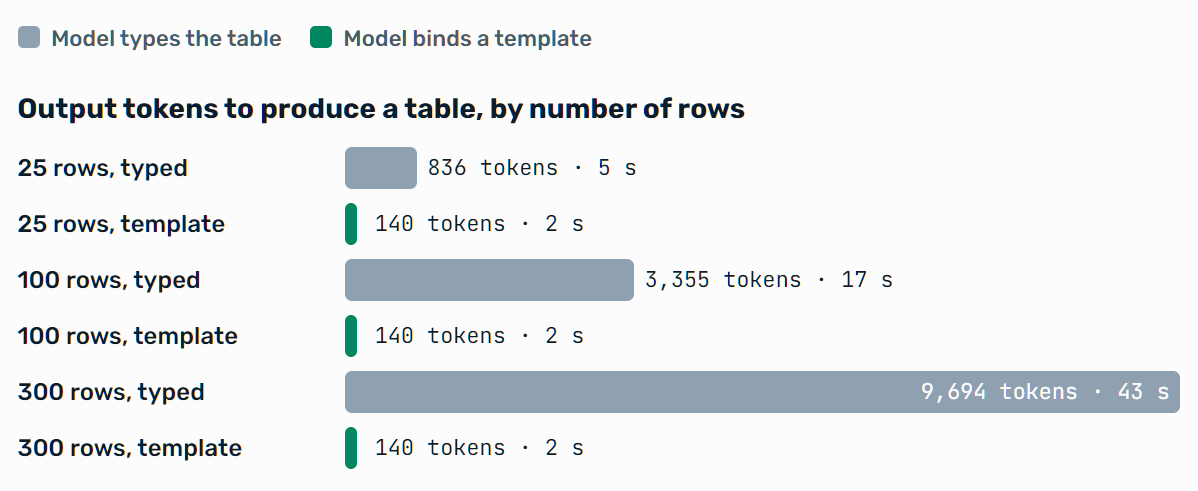
Output tokens and seconds, median of three runs, with the same CSV attached each time. At five rows the two are close: 195 tokens typed against 114 from a template.
The typed table grows by about 32 output tokens per row and the template stays flat. At 300 rows that is about 69 times fewer output tokens and about 20 times faster.
Typing the table also pulls the data into the conversation, which added about 22,000 to 27,000 cached input tokens at 100 and 300 rows.
Second, a weekly 25-row report. Authoring a packaged template once took about 7,000 output tokens in our first run and about 3,600 in a repeat. Each later report using the template then took about 260 output tokens to render, against about 2,200 to 2,800 to regenerate, roughly eight to eleven times fewer, so the template paid for itself after two to four reports. The five regenerated reports also came back in five different color palettes. The five rendered from the template were identical.
A rendered table also comes straight from the data, with no output tokens spent typing it, and its cost stays flat as the table grows.
Templates also hold up across a conversation. Agent Mesh keeps the template block in the conversation history, so in a follow-up turn the model reuses the block instead of typing the table out again. We ran a five-turn session that produced a 300-row weekly report on Claude Haiku 5.5, before and after Agent Mesh kept the block in history. Before, the model typed the table again in later turns, and the session cost $0.028 and took 118 seconds. After, it cost $0.0063 and took 37 seconds, about 78% less cost and 69% less time, and each follow-up turn ended in a model call of about 171 tokens instead of about 6,500, about 97% fewer. That is one run per case, so treat the numbers as indicative.
Templates are not automatic. In our runs, an agent with a file attached and a plain request to show it as a table chose a template on its own, but it typed the table when it had to compute or reformat numbers from a tool result.
Workflows Replace Turns with Nodes
The other way to save is to make fewer model calls. An agent chooses each next step with a model call, and every call re-sends the conversation. A workflow lays the steps out in advance as a graph. For more information, see What Are Workflows? and the workflow documentation. A tool node invokes a single tool directly, without a language model in the loop, so a fixed step costs no model call. An agent that runs five dependent steps makes at least six model calls, one to choose each tool and one to answer. The same five steps as tool nodes make none. An agent can invoke a workflow, and a workflow can call an agent, so the two can be mixed.
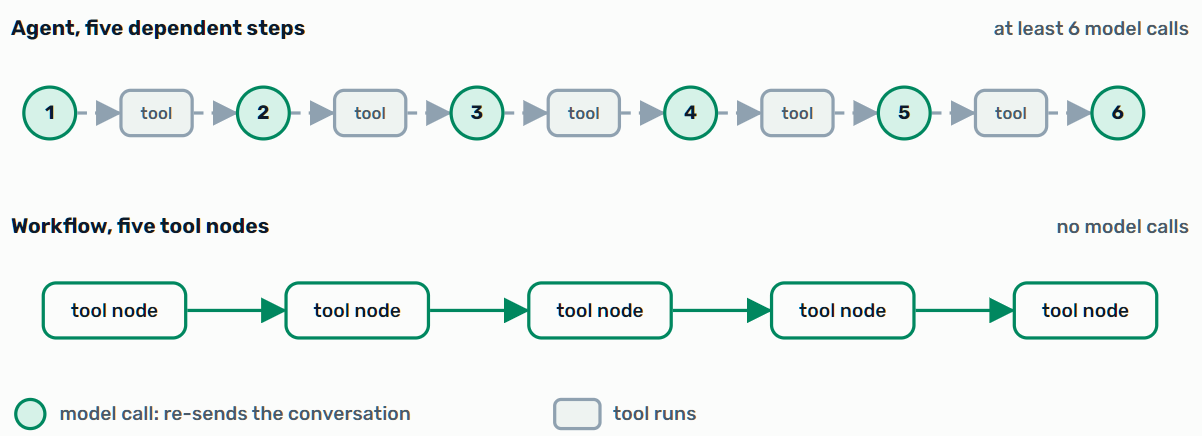
Each model call re-sends the conversation. Tool nodes in a workflow make no model call.
- Tool nodes can render templates (coming soon) — With packaged templates, a tool node can call the built-in
instantiate_templatetool, bind the template’s data input to an upstream node’s artifact, and render the document with no model call at all. With no model to correct a mistake, a template whose data breaks its contract fails the node with an error rather than finishing with a broken report. - Independent nodes run in parallel — Nodes that do not depend on each other run at the same time, and a
mapnode fans one step out across a list of items. - Agent nodes start fresh — A step that needs judgment sends a structured request to an agent and captures its response, so it does not begin with the history of the steps before it.
- Decision nodes replace a model turn with a small model call — A decision node asks a decision model typed questions about its input and routes on the answer, sending uncertain answers to another node. In our benchmark of 40 support tickets, a decision model answered in about 200 milliseconds, while Claude models making the same call took 1.3 to 1.5 seconds, and it cost about $20 per million tickets against $73 to $1,391.
A workflow saves model calls only when the same input should always take the same path. When the path is a judgment call, an agent is the right tool, and Smart Context Management still keeps its context small.
When Smart Context Management Helps Less
- Small results — Below the cap the model gets the full content, so there is little to save.
- Models that load everything back — If the model loads a large artifact back into the conversation, the saving shrinks. A
load_artifactcall without a range returns at most the first 100 KB, the tool-result limit, and tells the model which line to continue from. Asking for ranges keeps each load smaller. - Mid-sized structured results — The 8 KiB cap applies to the files and content a tool attaches to its result. A result that a tool returns only as structured data, such as the output of
list_artifactsorartifact_grep, reaches the model as it is up to the 100 KB tool-result limit. Above that limit, Agent Mesh saves the result as an artifact, and the model receives its status, message, and small fields with a reference to the rest. - Providers that do not report caching — Whether a provider honors the cache marks, and whether it reports cached-token counts, depends on the provider and on how Agent Mesh reaches it. Check that cached tokens are reported before you count on the discount.
Tuning It
The defaults suit most agents. If they do not suit yours, each mechanism has a setting in the agent’s app_config:
app_config:
  tool_result_auto_artifact_threshold_bytes: 16384   # largest attached text result kept in the conversation (default 8192)
  tool_result_inline_truncation_bytes: 65536         # largest structured-data tool result the model reads (default 102400)
  tool_result_preview_length_chars: 1000              # preview length in bytes for a stored text result (default 500)
  max_inline_artifact_bytes: 4096                     # largest text upload included in the message (default 2048)
Prompt caching is a model setting, and compaction has its own auto_summarizationblock in the same app_config. The preview setting counts bytes despite its name. With tool_result_processing_enabledset to false, Agent Mesh skips both limits: the model receives each result’s status, message, and structured data whatever their size, and none of its attached files.
A higher cap keeps more in the conversation, which raises the cost of every later call. A lower cap saves more, but the model then makes more artifact calls to read what the task needs. If your agents mostly handle small results, the defaults rarely matter. If they query large data sets or fetch long documents, they matter a lot.
Getting Started
Nothing needs turning on for the core techniques. Tool-result routing, upload references, history compaction, and five-minute prompt caching are on by default. Workflows are an Early Access feature. Inline template blocks are on by default for interactive agents. Packaged templates, which agents author once and reuse, are coming soon.
- Download Agent Mesh for macOS or Windows, or as an Experimental build for Linux, and run it on your own machine.
- Ask an agent to query a large file or fetch a long page, then open the artifact it creates and look at the reference the model received.
- Open the model form, check Prompt Caching Strategy under advanced settings, and select 1h if your tasks pause for minutes at a time.
- For a table built from a large file, ask the agent to render it with a template instead of typing it. For a fixed sequence of steps, try a workflow with
toolnodes. - Watch the context-usage indicator in a long conversation. It shows how close the conversation is to compaction.
- Open the Cost and Token Usage page in the Agent Mesh UI. The Smart Context Savings card estimates the tokens and cost that Smart Context Management kept out of the model, so you can compare it across your own data and kinds of work.
- Read the documentation for workflows, artifacts, skills, and models.
- For every setting, its default, its effect, and how the savings estimate is calculated, see Smart Context Management in the Agent Mesh documentation.
Where Your Data Goes
Smart Context Management reduces what the model receives. It does not keep data from the model. The preview, the column names, and anything the model loads with the artifact tools are sent to your model provider, and the artifacts themselves are stored in the artifact store you configure. Review your provider’s data-processing terms, and pass agents only the data their tasks need.
How We Measured
October 23, 2026. We called the function that formats attached tool-result content for the model, using default settings and an in-memory artifact store, on a synthetic CSV of order rows at four sizes, and counted the bytes of the JSON message the model receives. Token counts divide bytes by four, the approximation Agent Mesh uses when it compacts conversation history, so a real tokenizer will differ.
Dollar figures use Claude Sonnet 5.5’s list prices of $2 per million input tokens, $2.50 for five-minute cache writes, and $0.10 for cache reads, and the 1,457-token figure assumes six later model calls. The caching example is a calculation: 20 calls, a constant 30,000-token prefix, and one cache write and 19 reads at those prices. The multi-turn template figures come from one run per case on October 29, 2026, with Claude Haiku 5.5, and a five-turn session that produced a 300-row weekly report.
The template figures come from two runs on October 20, 2026, on a local stack built from Agent Mesh’s main branch, with a built-in agent, Claude Sonnet 5.5, and the coming-soon packaged templates turned on. We summed tokens across every model call in each task from the stack’s task records and took the median of three runs per cell, with the same CSV and every row present in every answer. In the first run, authoring a reusable template cost about 7,000 output tokens, and each report then cost 263 output tokens against 2,175 to regenerate. In the repeat, authoring cost about 3,600, and each report cost 261 against 2,772, so the break-even is a range. It is one model, one agent, and one data shape. We did not measure task quality, a workflow’s model calls against an equivalent agent, or dollar cost, and the decision-model figures come from our earlier decision-node benchmark. Treat all of the numbers as indicative and measure on your own agents.
What’s Next for Solace Agent Mesh
Packaged templates are coming soon. An agent will author a report template once and reuse it, and a workflow tool node will render it with no model call at all. The Smart Context Savings card already shows what Smart Context Management keeps out of the model today, and packaged templates extend the same idea to what the model writes.
Ready to try it on your own agents? Download Solace Agent Mesh, point an agent at a large file, and see what the model receives.
Frequently Asked Questions
What Is Smart Context Management?
It is the set of techniques Solace Agent Mesh uses to keep the text an AI agent’s model reads small, from storing large results as artifacts to caching, compaction, and steps that skip the model.
Does It Limit What My Agent Can Do?
No. The model still sees a reference to each stored artifact and can read the whole file, a slice of it, or search inside it when the task needs the content.
Does It Keep My Data From the Model Provider?
No. The preview, the column names, and anything the model loads are still sent to your provider. It is a cost and context control, not a data-loss-prevention control.
Do I Need to Turn It On?
Not for the core techniques, which are on by default. Workflows are an Early Access feature. Inline template blocks are on by default for interactive agents. Packaged templates are coming soon.
Does Prompt Caching Work with Every Model Provider?
It depends on the provider and on how Agent Mesh reaches it. Check that your provider reports cached tokens before you count on the discount.
Explore other posts from categories: Artificial Intelligence | Solace Agent Mesh




Subscribe to Our Blog
Get the latest trends, solutions, and insights into the event-driven future every week.