Decision Nodes: Fast, Cheap, Confidence-Aware Routing in Agent Mesh Workflows
Agent Mesh workflows have a new node type that asks an AI decision model a typed question and routes on the answer. Every answer comes with a confidence score, and uncertain ones escalate to a frontier LLM.
Almost every agentic workflow has steps where nothing needs to be written. Which team owns this ticket? Is this document privileged? Should this request go to the expensive model? Until now, those steps meant prompting an LLM, asking for JSON, parsing it, and branching on a string, with no signal for when the model was guessing.
Decision nodes replace that pattern with one call.
What’s in a decision node:
- Three question types, answered in one call. choice picks one option from a list you define, boolean scores a statement true or false, and score places the input on a scale of your own levels. Every answer arrives typed, with a probability. Ask several questions about the same input and it costs the same as asking one.
- Routing built in. Each option of a choice question maps to a downstream node, and a default catches the rest. The workflow owns the control flow; the model only makes the narrow call.
- Confidence-gated escalation. Set min_confidence and any answer below it goes to an escalation node, typically an LLM agent or a human-review step. With reroute (the default) the escalation node answers the same question and picks the route; with handoff it finishes the job itself.
- Graceful provider failure. on_provider_error: escalate sends a timeout or rate limit to the escalation node instead of failing the run.
- Loud configuration errors. A route key that isn’t an option, or an option with no route and no default, fails the workflow at load time, not at 2 a.m.
- Visibility in the Activities view. Each run shows the answer the model chose, its confidence, and dims the branches it didn’t take.
- Quick Build support. When a decision model is registered, Quick Build proposes a decision node for classify-and-route steps it would otherwise build from an agent and a switch.
Quick look at a triage node
| id: triage type: decision input: ticket: “{{workflow.input.ticket}}” questions: department: type: choice instructions: Which team should own this ticket? criteria: billing: Payment, invoice, or refund issues technical: Bugs, errors, or outages other: Anything else urgent: type: boolean instructions: The ticket needs an answer today. route_on: department routes: billing: billing_desk technical: tech_desk default: general_desk min_confidence: 0.8 escalate: review |
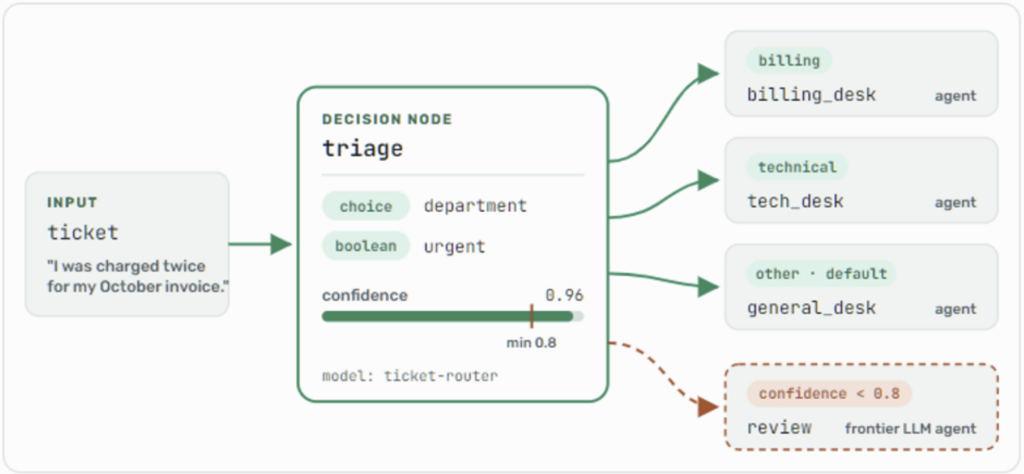
Two providers, one configuration
Decision nodes work with TypeSafe’s Jev models (called directly, through OpenRouter, or self-hosted behind the same API) and OpenAI’s GPT-6 Luna Decisions on the Decisions API. You write the same questions for either one and the node’s output has the same fields. The workflow names the model by alias, so switching providers is a single edit on the Models page and no workflow changes.
Both read images. List image artifacts from earlier nodes in the node’s images field and the model answers about the photo and the text together: how badly is this part damaged, is this scanned page an invoice.
How it performed
On a set of 40 synthetic support tickets, decision models matched the LLMs on clear-cut tickets while running about seven times faster, and Jev was 3.6x cheaper than Haiku 5.5 and 68x cheaper than Sonnet 5.5. The real difference showed on the ambiguous tickets: the LLMs answered with full certainty and disagreed with each other, while the decision models reported low confidence and would have escalated. Routing everything through Jev and sending the 15% below 0.8 to Sonnet 5.5 worked out to roughly a sixth of the cost of sending everything to Sonnet. Small sample, so measure on your own data. Full methodology and results in the blog post.
Quick note of caution
Decision nodes and decision models are Early Access. Schemas and behavior can change, and they aren’t recommended for production yet. A decision node sends its input, and any images, to the model’s provider, or to your own endpoint if you self-host. Agent Mesh sends nothing until an administrator registers a decision model and a workflow names it, so review the provider’s data-processing terms first and pass each node only the fields its questions are about. Decision nodes are enabled by default; an administrator can disable them with SAM_FEATURE_WORKFLOW_DECISION_NODE=false.
Try it now
Download Solace Agent Mesh for macOS, Windows, or Linux. On the Models page, choose Add Model, select the Decision model type, and pick TypeSafe or OpenAI. Add a decision node to a workflow, run it on a sample of real inputs, and watch the confidence each run reports in Activities. Find the point where answers start to go wrong and set min_confidence just above it.