

MCP is an open-source standard for connecting AI applications to external systems.
Agents need a standard way to access tools and data. MCP (short for Model Context Protocol) enables AI systems to connect to external APIs, databases, and services through a single, declarative interface.
In basic terms, MCP allows for LLM-enabled microservices that define functions (i.e. tools) with access to endpoints (i.e. external systems). By providing a standardized protocol, MCP reduces development time and complexity while giving AI applications access to a rich ecosystem of data sources, tools, and capabilities that enhance the end-user experience.
Introduced by Anthropic in late 2024 and endorsed by OpenAI, Google, and Microsoft, MCP is open-sourced on GitHub under the Model Context Protocol organization, with a growing number of https://github.com/modelcontextprotocol/serversreference implementations. MCP reduces integration friction and makes enterprise data instantly usable inside agentic workflows, offering:
- Unified integration — One protocol for accessing any tool or dataset.
- Built-in governance — Control which agents can invoke what, with centralized oversight.
- Real-time interaction — Streamable HTTP and SSE transports for responsiveness.
MCP Transport Mechanisms
At its core, MCP is built on top of client-server interactions and it supports multiple transport mechanisms for this communication, each suited to different deployment scenarios. Understanding these transports is key to successfully integrating MCP servers with your agents in any agentic system.
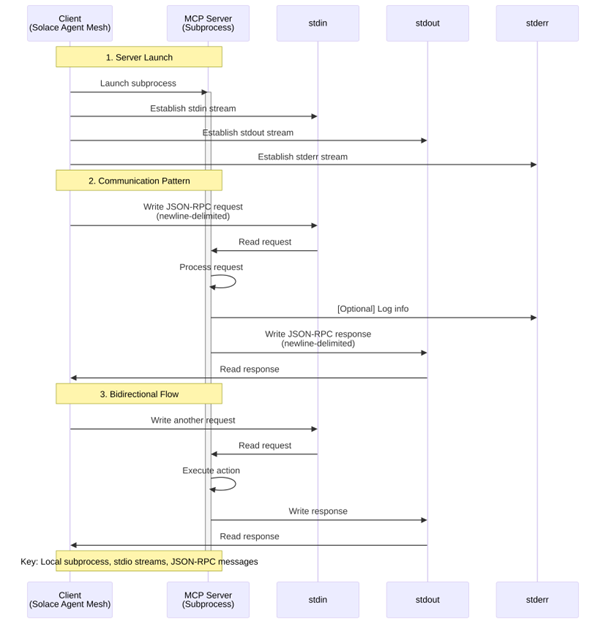
Stdio (Standard Input/Output)
This is the simplest and most common method for connecting to MCP servers, particularly for local development and single-agent scenarios.
How it works:
- The client (in this case, Solace Agent Mesh) launches the MCP server as a subprocess
- The server reads JSON-RPC messages from its standard input (stdin)
- The server sends responses to its standard output (stdout)
- Messages are delimited by newlines and must be valid JSON-RPC format
Example use case: Running a filesystem MCP server locally to give your agent file manipulation capabilities.
Server-Sent Events (SSE)
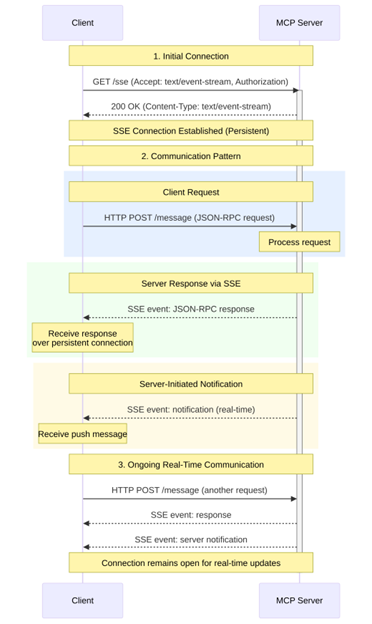
Server-Sent Events is a standard HTTP-based protocol that enables servers to push real-time updates to clients over a single long-lived connection. Note that in the context of MCP, SSE is part of the newer Streamable HTTP transport mechanism.
How it works:
- The client establishes an HTTP connection to a remote MCP server
- The server can push messages to the client as events over this persistent connection
- The client sends requests via HTTP POST to the server endpoint
- The server can respond with either immediate JSON responses or SSE streams for long-running operations
This transport is ideal for remote MCP servers that need to serve multiple clients or production environments where connection resilience is important.
Example use case: Connecting to a centralized MCP server that provides access to enterprise databases or APIs across multiple agents.
Streamable HTTP
Streamable HTTP is MCP’s sophisticated HTTP-based transport that combines the simplicity of REST with the real-time capabilities of streaming. It’s designed to support everything from basic request-response patterns to complex, stateful interactions.
At its core, Streamable HTTP is a single HTTP endpoint that handles both sending (via POST) and receiving (via GET) operations, simplifying deployment and firewall configuration. The transport supports optional SSE streaming, enabling efficient handling of long-running operations without blocking connections and allowing servers to push real-time notifications to clients.
Streamable-http is ideal for remote MCP servers that need to serve multiple clients simultaneously while maintaining stateful sessions across complex, multi-step interactions.
Example use case: Enterprise-grade MCP servers providing access to sensitive internal systems with proper authentication and session management.
Docker-Based Deployment
While not a separate transport protocol, running MCP servers in Docker containers is a deployment pattern that typically uses the stdio transport with Docker as the command executor.
How it works:
- Agent Mesh launches a Docker container running the MCP server
- Communication happens via stdin/stdout through the Docker runtime
- Environment variables can be passed securely to the containerized server
- Containers can be ephemeral or long-running based on your needs
This approach is ideal for isolated execution environments where managing dependencies and runtime requirements is containerized, and isolation between MCP servers and the host system is required
Example use case: Running an MCP server with specific Python dependencies in an isolated container to avoid conflicts with other system packages.
MCP and Solace Agent Mesh
Solace Agent Mesh provides native MCP support through the framework itself without additional plugins required. You can connect to MCP servers directly by configuring your agent YAML file with MCP tools, leveraging any of the transport mechanisms we just discussed. For example, to configure a connection to an MCP server with streamable-http support.
tools:

  – tool_type: mcp

    connection_params:

      type: streamable-http

      url: “https://mcp.example.com:8080/mcp/message”

      headers:

        Authorization: “Bearer ${MCP_AUTH_TOKEN}”
Connection to Execution
Once you’ve configured your agent with MCP tools, Solace Agent Mesh handles the entire lifecycle seamlessly:
- Connection: When your agent starts, Agent Mesh establishes a connection to the MCP server using your specified connection parameters (stdio, SSE, or Streamable HTTP).
- Discovery: Agent Mesh queries the MCP server for all available tools, resources, and prompts. This happens automatically; the implementation details is abstracted from the user
- Registration: All discovered capabilities are registered as tools within your agent, appearing alongside any built-in tools or custom Python tools you’ve defined.
- Execution: When a user interaction requires one of the MCP tools, Agent Mesh automatically:
- Translates the request from A2A protocol to MCP protocol
- Executes the tool on the remote MCP server
- Receives the response and translates it back to A2A protocol
- Integrates the result into the agent’s response flow
This transparent protocol translation means you can seamlessly mix MCP tools with built-in Agent Mesh tools and custom Python functions, all within a single agent configuration. Your agent doesn’t need to know or care about the underlying transport mechanism; Agent Mesh handles all the complexity. For example, you might create an agent that uses MCP filesystem tools to read and write files, leverages built-in artifact management tools for data persistence, calls custom Python tools for domain-specific business logic, and connects to another MCP server for database access
tools:

  # MCP filesystem server

  – tool_type: mcp

    connection_params:

      type: stdio

      command: “npx”

      args: [“-y”, “@modelcontextprotocol/server-filesystem”, “/workspace”]

  # Built-in artifact tools

  – tool_type: builtin-group

    group_name: “artifact_management”

  # Custom business logic

  – tool_type: custom

    module_path: “my_company.custom_tools”

  # Remote MCP database server

  – tool_type: mcp

    connection_params:

      type: streamable-http

      url: “https://internal-mcp.company.com/database”
The combination of MCP’s standardized protocol and Solace Agent Mesh’s native integration support creates a powerful platform for building sophisticated AI agents that can interact with a vast ecosystem of external tools and data sources. Whether you’re building a simple file-manipulating assistant or a complex enterprise agent that orchestrates multiple data sources, MCP integration gives you the flexibility and power to bring your vision to life.